


 Click it and Unblock the Notifications
I Replaced Cloud Subscriptions With the Synology BeeStation Plus; Here's My 4-Month Verdict

The basic idea behind the Synology BeeStation Plus is to take the usually complicated setup of a NAS and turn it into something closer to plug-and-play. That matters because the BeeStation is aimed squarely at people who have never owned a NAS before and don't want to go through the technical process that typically comes with one. For beginners, it's close to ideal.
What makes the Plus variant worth paying attention to over the original BeeStation is that it doesn't just offer more storage; it also brings Plex Media Server integration into the picture (no pun intended). I've been using it for the past four months, and in this long-term review, I'll get into the pros, the cons, and exactly who this NAS is made for - and whether it's worth your money.

Who is the BeeStation Plus for?
A NAS, or Network Attached Storage, is essentially a personal hard drive that lives on your home network. Think of it as your own private cloud, one that sits in your home and doesn't charge you a monthly fee. Traditionally, setting one up has involved a fair amount of technical know-how.
That's exactly where the BeeStation Plus fits in. It's not a full-fledged NAS, which is precisely why Synology calls it a cloud storage solution rather than a NAS, the way it does with its DiskStations. It's built for someone who has never set up a NAS before and has no interest in going through the technical process that usually comes with one.
The BeeStation Plus is for the person who has a growing photo library scattered across Google Photos and iCloud, who's tired of paying for streaming services they don't fully control, or who simply wants their data to live somewhere they own rather than on someone else's server. You don't need any prior experience with networking or storage hardware. If you can set up a new phone, you can set up the BeeStation Plus. If that sounds like you, read on.
Synology BeeStation Plus Review: Two-Minute Review
The Synology BeeStation Plus is Synology's attempt at making personal cloud storage accessible to people who have never owned a NAS before, and it largely succeeds. Setup takes under 30 minutes, the software is simple enough for anyone to figure out, and between BeeFiles, BeePhotos, and Plex Media Server integration, it covers most of what the average person needs from a private cloud. Over four months it replaced Google Drive and iCloud for me entirely.
At ₹70,000 for the 8TB model, the upfront cost is significant, but stacked against years of monthly subscription fees it starts to make sense quickly. Eight users are supported, making it practical for families or small teams.
The trade-offs are worth knowing upfront. BeeStation OS is a locked ecosystem with no third-party app support, so tools like Emby, Jellyfin, Sonarr, and Radarr are off the table.
There's no redundancy either, so a drive failure without an external backup would be a serious problem. A UPS is also strongly recommended if you're in an area with unstable power.
For beginners who want their data off someone else's server, it's an easy recommendation. Power users should look elsewhere.
Synology BeeStation Plus Review: Design and Compactness
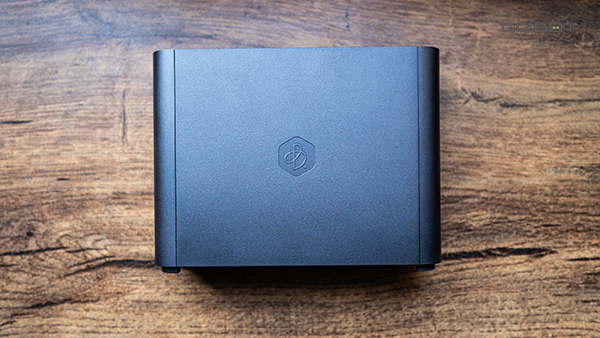
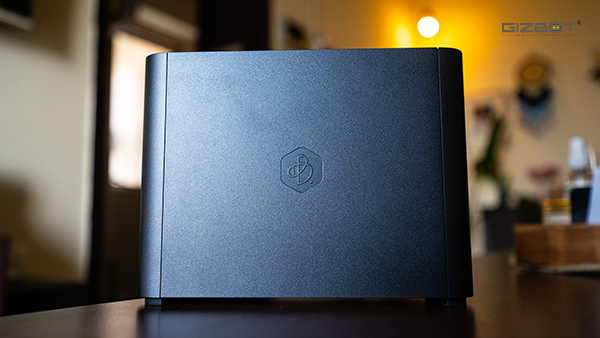
The BeeStation Plus doesn't try to make a statement. It's a compact, understated black box that's simple and a little chunky, but not unpleasant to look at. The easiest way to describe it is as a very miniaturised PC, stripped down to just what it needs to be. It's light enough that you won't think twice about where to put it, and small enough that it genuinely doesn't take up meaningful desk space. Four rubber legs on the bottom keep it grounded, which is a small but thoughtful detail. Mine has sat on my desk for four months without ever feeling like it's in the way.
The only thing I had to think about was how to get it into my room, since it needs an ethernet connection around the clock. Living in an area prone to electricity cuts also meant hooking it up to a UPS. But that's a me problem - your situation will likely be different.
Synology BeeStation Plus Review: Connectivity and Ports
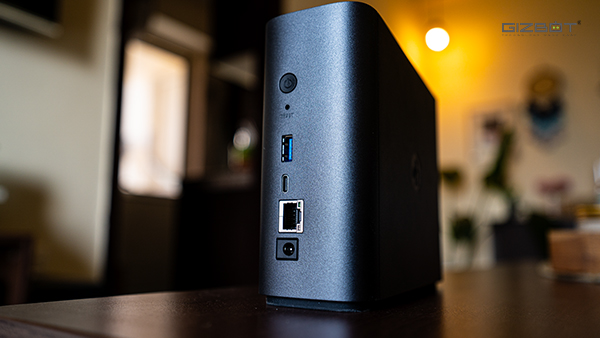
The front is almost entirely bare, save for a small white LED indicator that tells you whether the device is on or off. The back is where all the action is. You get a USB-A 3.2 Gen 1 port and a USB-C 3.2 Gen 1 port, both of which come in handy for plugging in a pendrive or an external drive when you want to transfer files or set up a backup. A 1GbE RJ45 Ethernet port handles network connectivity, and rounding things out are a physical power button, a reset pinhole, and the power port.
It's a practical, no-nonsense design that suits the device's purpose well. Nothing about it feels premium, but nothing feels cheap either. It's built to live quietly in a corner and do its job, and in that sense, the design philosophy mirrors the product philosophy almost perfectly.
Synology BeeStation Plus Review: Performance
Under the hood, the BeeStation Plus runs on an Intel Celeron J4125 paired with 4GB of DDR4 RAM, drawing up to 36W of power during use. On paper, it's modest hardware, but as you'll see, it's spec'd appropriately for what the device is actually designed to do.
The bigger story is the software. Where Synology's DiskStation NAS devices run DSM, the BeeStation Plus runs BeeStationOS, a stripped-down version of the same platform built to run efficiently on this hardware and, more importantly, to be immediately approachable for someone who has never touched a NAS before. I handed it to my partner and my parents at different points over the past four months, and both of them figured it out without needing any help from me.
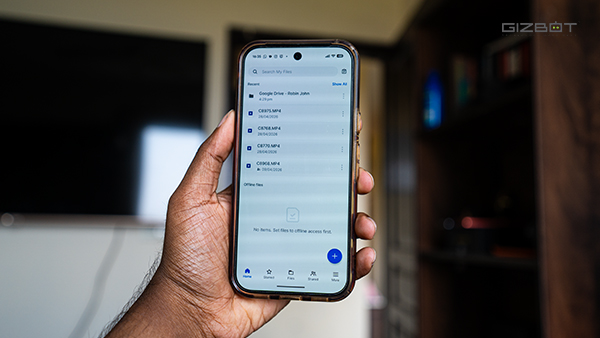
Once you've set up your Synology account and logged into the portal, you're greeted with two core apps: BeeFiles and BeePhotos. The names tell you everything you need to know. A recent update has also added BeeCamera to the mix. Both BeeFiles and BeePhotos have companion apps on iOS and Android, which is really the whole point since most of your interaction with the device happens from your phone, since you're backing up photos and videos from the app.
Synology BeeStation Plus Review: Software / Bundled Experience
BeeFiles works essentially like a private Google Drive. I use it to upload videos I shoot for work, drop them into a shared folder, and my teammates can access and download them directly for editing. The files stay off third-party servers, and there's no monthly storage bill creeping up. You can also back up your existing cloud services directly onto the drive, which is a good way to start consolidating everything in one place.
BeePhotos handles automatic photo and video backup from your phone as long as you have the setting enabled, and it organises everything into folders and albums. It works well for the most part, though the search algorithm isn't anywhere close to what Google Photos offers. If you've grown used to searching "beach 2022" and having your phone surface exactly the right photos, BeePhotos will feel like a step back in that specific regard. It's not entirely bad, but a bit inconsistent in its current stage.
The BeeStation Plus supports up to eight users, each of whom can use it as their own personal storage space, uploading files and photos independently. Over four months, I've filled up around 5TB across photos, my Plex media library, and a full Time Machine backup of my PC. There's still roughly 2TB left, which gives you a sense of how much headroom 8TB actually offers for real, mixed use.
Plex Media Server integration is one of the standout features of the Plus variant, and it's genuinely well implemented. You'll find it sitting inside the integrations section of the BeeStation portal, and the setup process is about as smooth as it gets. BeeStation handles the heavy lifting of getting things ready, then hands you off to Plex's own setup guide to finish the job. Enable SMB, point Plex at your BeeStation as a network drive, let it scan your media library, and you're done. Hardware transcoding is supported as well, which makes a meaningful difference when you're streaming higher resolution content. If you're exhausted by juggling multiple OTT subscriptions and want a single place for your own media collection, this feature alone might justify the purchase.
Where the BeeStation Plus starts to show its constraints is the moment you want to go beyond what it was designed for. The locked-down nature of BeeStationOS means you cannot install third-party applications, so if you were hoping to run Sonarr, Radarr, or any of the other tools that make a DiskStation so powerful, that's not an option here. You're also committed to Plex. Emby and Jellyfin aren't supported, so if you want to explore alternatives down the line, you'll find the door firmly closed.
The hardware limitations are worth understanding as well. There's a single 8TB drive inside with no option for expansion and no way to set up redundancy. For most people, 8TB will be more than sufficient, but the lack of any redundancy means that if the drive fails, recovering your data is going to be a serious challenge. It's worth keeping an external backup of anything truly irreplaceable.
One thing I'd strongly recommend, regardless of where you live, is plugging the BeeStation Plus into a UPS. Power cuts caused the drive to shut down abruptly around ten times before I finally connected it to a UPS, and each time Synology sent me a notification warning me about the risk to the drive. A spinning hard drive and sudden power loss are not a good combination, and it's an easy problem to prevent.
None of that changes the fundamental picture, though. For what it sets out to do, the BeeStation Plus does it remarkably well.
Synology BeeStation Plus Review: Value for Money
The Synology BeeStation Plus retails for around ₹70,000, though the price fluctuates, and I've seen it dip as low as ₹61,000. That's a significant upfront investment, but it's worth reframing how you think about that number. If you're currently splitting money across iCloud, Google Photos, and a handful of streaming subscriptions every month, the BeeStation Plus starts paying for itself faster than you'd expect. After four months, it has completely replaced iCloud and Google Photos for me. My Plex library is growing, and switching away from the streaming services entirely is a matter of time at this point.
For the person this is built for, it's genuinely hard to fault. You get a private cloud that you own outright, a seamless photo backup solution, a capable media server, and enough storage to last most people several years. The setup takes under 30 minutes, the software is approachable enough for anyone in your family to use, and once it's running, it largely takes care of itself.
If you're a power user looking for the flexibility of a full DiskStation, the BeeStation Plus will frustrate you. The locked ecosystem, the lack of third-party app support, and the absence of any redundancy make it a poor fit for someone who wants to push their hardware further.
At some point, renting space on someone else's server stops making sense. The BeeStation Plus is the easiest way I've found to cross that line without needing advanced technical know-how.
-
 54,999
 -
 99,999
 -
 1,44,900
 -
 89,998
 -
 46,500
 -
 57,998
 -
 53,989
 -
 1,59,999
 -
 1,29,999
 -
 99,999
-
 70,499
 -
 1,56,900
 -
 1,30,990
 -
 17,084
 -
 16,999
 -
 30,999
 -
 9,999
9,999 -
 79,900
 -
 8,999
8,999 -
 79,999
-
 20,999
 -
 37,999
 -
 25,999
 -
 31,999
 -
 24,999
 -
 10,999
 -
 15,999
 -
 45,999
 -
 19,499
 -
 1,61,999
-1763362932432.svg)

 Continue with Google

