


 Click it and Unblock the Notifications
NoiseFit Halo 3 Review: A Classy Watch With Plenty Going for It

The NoiseFit Halo 3 wants to be the smartwatch you actually wear every day. Not just because it tracks your steps, but because it looks good enough to not want to take off. I've had the Silicon Black variant (Rs 5,499) on my wrist for close to two weeks now. I'll say upfront: I didn't expect to like it as much as I do. Here's why.

NoiseFit Halo 3 Review: Two-Minute Review
The NoiseFit Halo 3 is a Rs 5,499 round-dial smartwatch that looks like it costs a lot more. The stainless steel body, 1000-nit AMOLED display, and lightweight fit make it one of the better-looking and more comfortable smartwatches in its segment.
Feature-wise there's plenty to like: Noise Vault for storing QR codes on your wrist, a step streak and Noise Coins system that actually motivates you to move, a customisable Smart Dashboard, and an AI feature in the app that answers health questions based on your own data. I've been wearing it for two weeks and genuinely like it more than I expected to.
That said, battery life falls short of the claimed 7 days, expect 3 to 5 in real use. The charging puck misaligns too easily, voice transcription misses too much to rely on, and the NoiseFit app has baked-in ads you can't turn off, which is frustrating for a paid product. Watchface customisation is limited too for a watch that leads so clearly with design.
But at Rs 5,499, those are complaints you can live with. If you want a smartwatch that looks confident on the wrist and gives you enough to use every day, the Halo 3 is worth your money.
NoiseFit Halo 3 Review: Design and Build
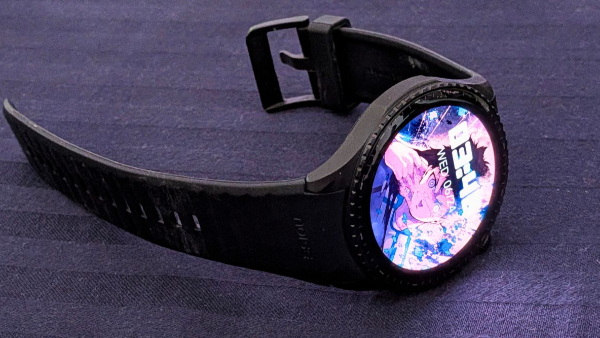
The Halo 3 looks good. That's the first thing you notice. The stainless steel body and integrated strap create a clean, unified silhouette that doesn't look like a budget watch. The precision cuts along the dial edge add some visual character without being overdone. Wear it to a meeting or dinner and nobody's going to clock it as a sub-Rs 6,000 smartwatch.
It comes in four variants: Elite Black with a metal strap, Leather Brown, Leather Blue, and Silicon Black. Prices range from Rs 5,499 to Rs 5,999 depending on the strap. The review unit here is the Silicon Black at Rs 5,499.
NoiseFit Halo 3 Review: Design and Comfort
I'll be upfront: I don't like wearing smartwatches. The weight usually bothers me, and I'm typically counting down the days until I can take one off. The Halo 3 broke that pattern.
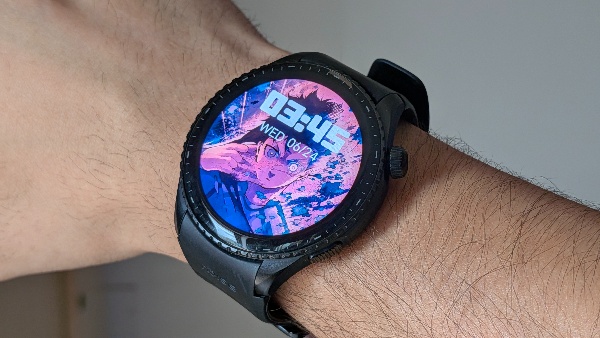
It sits well on the wrist without feeling oversized or bulky. I don't have very wide forearms, and the watch proportions nicely without looking too big or too small. More importantly, it's light. Light enough that you genuinely stop noticing it after a while. I wore it all day, every day through the review period and never felt the need to take it off because of discomfort.
The Silicon Black strap is comfortable for extended wear too. It doesn't tug at arm hair or feel sticky after a few hours, which is a common complaint with silicone straps at this price.
If you're someone who's been putting off getting a smartwatch because you don't like the feel of wearing one, the Halo 3 is worth trying. It's one of the least intrusive smartwatches I've worn.
NoiseFit Halo 3 Review: Display
The 1.43" AMOLED panel runs at a 466x466 resolution and goes up to 1000 nits. It earns that brightness number outdoors. Text is sharp, colors are vivid, and there's no squinting in direct sunlight. Indoors it's equally easy to read at lower brightness settings.
Wake gestures are all covered. Raise to wake, tap to wake, and cover to sleep are all here. Small things, but they make daily interaction feel natural rather than clunky.
There's Always On Display too, and you can schedule it for specific time windows rather than leaving it on all day. Handy if you want to glance at the time without it running down your battery around the clock.
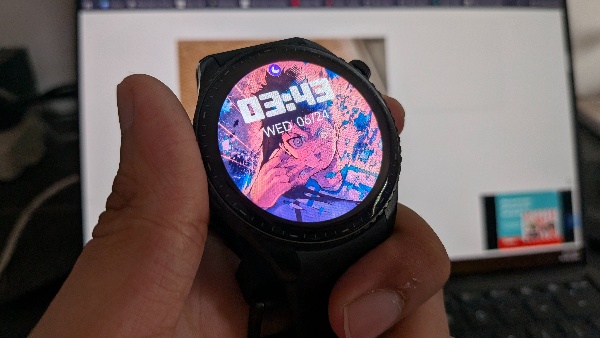
Watch faces are cloud-based so there's a decent library to pick from. You can also set a custom photo as your wallpaper watchface, and it looks really good on the AMOLED panel. Colors pop, and the round dial gives it a clean, almost premium feel. The one frustration is that preset watchface customisation is limited. You can't freely position the time, and the text style choices are thin. For a display this good, that's a shame.
Overall it's one of the better panels you'll find on a smartwatch under Rs 6,000. It does exactly what you want a smartwatch display to do, and then a little more.
NoiseFit Halo 3 Review: Performance
Day-to-day navigation on the watch is smooth. Swiping through menus, accessing the Smart Dashboard, pulling up health stats, it all responds quickly without any noticeable lag.
Auto workout detection works well. The watch picked up an outdoor walk without any manual input and started tracking distance, calories, and heart rate on its own. That's not always reliable at this price, so it's good to see it working correctly here.
The AI Voice Engine is where things get inconsistent. You hold the dedicated button and speak your command. Start a workout, check heart rate, summarize your day. It works sometimes. Other times the command just doesn't register. It's hit and miss, and you can't count on it when you actually need it.
AI Voice Notes tells a similar story. The mic quality is better than most smartwatch mics, which tend to sound muffled. Recording itself is fine. Transcription is the problem. It missed a large chunk of what was spoken during testing, so you really can't rely on it for anything important like meeting notes or ideas you need to capture accurately.
The AI summary, though, is a different story. Even when the transcription drops content, the AI generates a clean and reasonably accurate summary of what was recorded. So it works as a quick memo tool. Just not as a transcription service.
NoiseFit Halo 3 Review: Features
There's a lot packed in here, and most of it is genuinely useful.
Step Tracking and Noise Coins
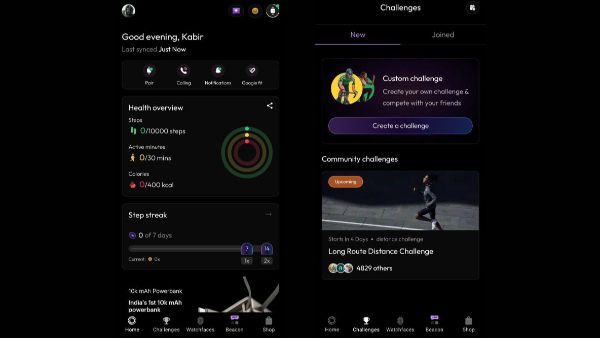
The watch tracks steps, calories burned, and keeps a step streak counter showing how many consecutive days you've hit your daily goal. That streak counter is a small thing but it works as motivation. You don't want to break it.
The streak connects to Noise Coins. Walk 3,000 steps and you get 50 coins. Complete a workout, earn more. Finish a 20-minute session, earn more again. I've built up 950 Noise Coins just through regular use. Inside the NoiseFit app there's a Noise Shop where those coins convert into discounts on Noise products. Thirty Noise Coins gets you 15% off the Noise Airwave Max 6, for example. If you're planning to stay in the Noise ecosystem, the coins are worth accumulating.
Noise Vault
This is a digital passbook built into the watch. You upload QR codes through the NoiseFit app, boarding passes, movie tickets, concert passes, store loyalty codes, and they sync to the watch. At an airport or venue, you pull up the Noise Vault menu, select the pass, and hold your wrist up to the scanner. No phone, no fumbling. It's one of those features that sounds minor until you actually use it at a boarding gate.
Health Tracking
The health suite on the Halo 3 covers a lot of ground for a Rs 5,499 watch.
You've got continuous heart rate monitoring running all day in the background, with the option to check it manually too. SpO2 tracks your blood oxygen levels, stress monitoring keeps an eye on your stress patterns, and the built-in pedometer counts your steps throughout the day. All of it syncs to the NoiseFit app where you can dig into the data in more detail.
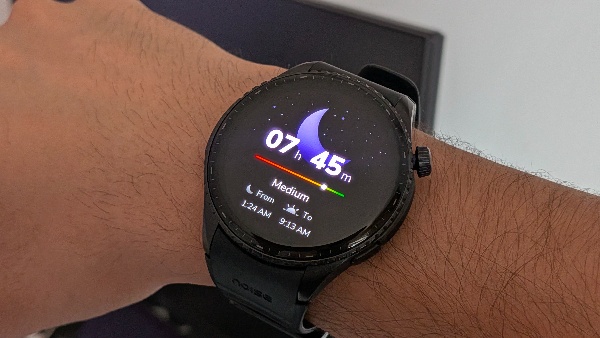
Sleep tracking breaks down your night into light sleep, deep sleep, and REM stages, and gives you a Sleep Score in the morning. It's not clinical accuracy, but for a general read on how well you actually slept, it does the job.
There's a Breathe feature too. It guides you through breathing exercises at three speeds, fast, moderate, or slow, and shows you how your heart rate changed during the session. It's a small thing but genuinely useful if you're trying to wind down or manage stress during the day.
Female cycle tracking is in there as well, which is worth knowing if that's relevant to you.
Calorie burn is calculated using heart rate, activity duration, steps, distance, and your personal stats like height, weight, and age. It's a more thorough calculation than most budget smartwatches bother with. Hydration tracking is available on the Smart Dashboard too, with reminders to drink water through the day.
None of this replaces a medical device and Noise is upfront about that. But as a daily health companion for the general population, it's one of the more complete setups you'll find at this price.
Water Resistance
Wore it in the shower with no issues. The touchscreen didn't respond well with water on it, which is expected, but the watch itself worked fine throughout. The 10-metre water resistance rating holds up in real use.
The watch also has a mode for ejecting water from the system.
NoiseFit Halo 3 Review: Features and App Experience
The NoiseFit app is well designed and has more going on than you'd expect.
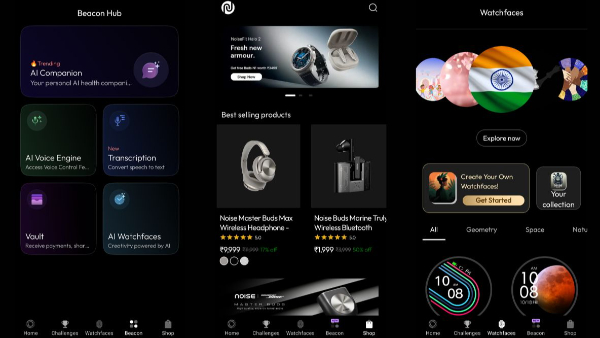
You can create custom workout challenges, share them with the community, and compete with friends on step counts and activity goals. The rewards system ties into all of this, so there's an actual reason to keep opening the app. It doesn't feel like a companion app that exists just to sync your data. It feels like something you'd open on its own.
The Beacon Hub is the more interesting part. Noise AI inside it lets you ask health and fitness questions based on your own data. Ask it to analyze last night's sleep, summarize your workouts for the past two days, or put together a muscle gain plan. It pulls from your actual activity rather than giving generic answers. There's a limit of 10 chats per day, so keep that in mind.
The Smart Dashboard sits to the left of the watch face and shows weather, AQI, music controls, and alarms. All customisable. Morning Briefs give you a sleep and activity summary on your wrist without needing to open your phone. Super Notifications on Android surfaces the alerts that actually matter, OTPs, ride statuses, delivery updates, without you having to reach for your phone.
Now the frustrating part. The app pushes a lot of notifications by default, and there are ads baked into the interface that you can't turn off. The fix for the notification spam is to turn off General and Push notification categories right after installing. The in-app ads have no fix. For a product you've already paid for, that's a poor call by Noise.
NoiseFit Halo 3 Review: Battery Life
Noise claims up to 7 days. Here's what actually happened.
Started at 90% on Thursday evening, June 11. By June 14 it was at 18%. Three days of regular use. After charging, I turned on auto workout detection and automatic brightness. That second charge lasted from June 14 evening to June 18 at 8:28 PM, dying at 9:53 PM. Just under four days.
So realistically, plan for 3 to 5 days depending on what you have switched on. That's not a bad result for the price, but it's not 7 days in normal use. To be fair to Noise, the 7 day claim likely assumes minimal settings, lower brightness, and no auto workout detection. With everything on, you're looking at closer to 4 days.
Charging speed is good. From 1%, it hit 31% in 24 minutes and 80% in about 72 minutes. Full charge is rated at up to 2 hours and that checks out in testing.
The charging puck is the weak link. It's magnetic but the attachment is poor. It slips out of alignment easily, sometimes just from picking the watch up to check the time. For an otherwise solid device, the puck feels like an afterthought. Noise really needs to sort this out.
NoiseFit Halo 3 Review: Connectivity
The Halo 3 runs on Bluetooth v5.3 and pairs with both Android (9.0 and above) and iOS (11.0 and above). Pairing through the NoiseFit app is straightforward and the connection stays stable during regular use.
Super Notifications on Android is worth turning on. It surfaces contextual alerts like OTPs, ride updates, and delivery notifications directly on the watch so you're not constantly reaching for your phone. It's Android only though, which is worth knowing if you're on iOS.
One thing to note is that the NoiseFit app needs to be running in the background for notifications to come through reliably. On Android this is mostly a non-issue once you allow the app to run in the background. On iOS it can be a little more finicky depending on your settings.
NoiseFit Halo 3 Review: Call Quality
The Halo 3 supports Bluetooth calling with a built-in mic and speaker. For a smartwatch at this price, it holds up reasonably well.
Call clarity is decent for quick conversations. The person on the other end can hear you clearly enough, which is partly down to the mic being cleaner than most smartwatch mics at this price. As mentioned in the Performance section, it doesn't have that typical muffled, muddy quality you get from budget smartwatch mics.
That said, it's not something you'd choose over picking up your phone. In noisy environments it struggles, and the speaker volume, while adequate indoors, won't cut it in loud spaces. Think of it as a convenience feature for quick calls when your phone isn't in reach, not a replacement for actually taking the call on your phone.
-
 54,999
 -
 99,999
 -
 1,44,900
 -
 89,998
 -
 46,500
 -
 57,998
 -
 53,989
 -
 1,59,999
 -
 1,29,999
 -
 99,999
-
 70,499
 -
 1,56,900
 -
 1,30,990
 -
 17,084
 -
 16,999
 -
 30,999
 -
 9,999
9,999 -
 79,900
 -
 8,999
8,999 -
 79,999
-
 20,999
 -
 37,999
 -
 25,999
 -
 31,999
 -
 24,999
 -
 10,999
 -
 15,999
 -
 45,999
 -
 19,499
 -
 1,61,999
-1763362932432.svg)

 Continue with Google

