


 Click it and Unblock the Notifications
Acer Aspire 5 Review: The Sensible Student Laptop at Rs 76,999

The Acer Aspire 5 is a student laptop, and it isn't trying to be anything else. It's 14 inches, weighs 1.2kg, and mine is the Intel Core Ultra 5 125H variant with 16GB of RAM and a 512GB SSD, going for ₹76,999. I've had it for about a month, writing scripts on it and carrying it around in a bag the same way a college student would, which is really the only way to find out whether a laptop like this holds up.
And what you want from a laptop at this price isn't complicated. It should be light, it should survive being lugged around all day, and it should get through coursework and a browser full of tabs without making you wait. The Aspire 5 does most of that. But there's one area where it falls short, and depending on who you are, it's either a shrug or the whole reason to walk away.

Acer Aspire 5 Review: Two-Minute Review
The Aspire 5 is a student laptop and it doesn't pretend to be anything else. It weighs 1.2kg, and after a month of taking it in and out of my bag, that's still the thing I'd point to first. It's genuinely easy to live with.
The lid is metal and the rest is polycarbonate, so it doesn't feel premium in the hand, and there's clear flex in the keyboard area. That said, the matte finish across the body grips well and stays clean, and the hinge has held up nicely over the month.
Ports are the surprise here. Three Type-A, full-size HDMI, an SD card slot, a combo jack and a USB-C that charges the laptop. I didn't need a dongle even once, which is not something I can say about laptops costing twice this.
Typing on it is fun, the trackpad handles gestures without any fuss, and the Core Ultra 5 125H got through a pile of tabs and side-by-side apps without slowing down. There's no biometric login of any kind though, so you're entering a PIN every time.
The display is the weak spot. It's a 14-inch 1920x1200 IPS panel at 60Hz, and it looks flat. Bright enough indoors and the anti-glare coating helps, but this isn't a screen you'll enjoy looking at. Battery gets you around half a workday, and the 54Whr cell fills up in an hour and 45 minutes.
Acer Aspire 5 Review: Design and Build
The Aspire 5 looks plain, and I don't think that's a problem. It's the kind of laptop that sits open in a lecture hall or a library without anyone glancing at it twice, which is fine, because the thing that actually matters here isn't the styling. At around 1.2kg in a 14-inch body, this is genuinely easy to carry. It slides into a bag without a fuss, and after a month of taking it around, I never once thought twice about bringing it along. If you're a student lugging a bag around all day, this is also the part that will matter to you.
The lid is metal, and the rest of the body is polycarbonate. So no, this doesn't feel premium in the hand, and this is clearly where Acer has cut costs to keep the price where it is. The overall look and feel isn't very modern either. The texture is also worth mentioning. There's a fine grain across the entire body, and you can feel small particles under your palm when you're using it. This does slightly help with the grip, and it doesn't hold fingerprints the way glossier machines do.
Build quality is okay, nothing more. There's clear flex in the keyboard area when you type with any weight behind it, and that's not something you want to notice on a laptop you're carrying around every day. The lid also doesn't open with one hand, so you'll need both, every single time.
The hinge, on the other hand, is quite good. I've been using this for about a month now, and it has held up well, plus it folds a full 180 degrees flat if that fits your use case.
/img/2026/08/mainn-1786879690.jpg)
Acer Aspire 5 Review: Ports and Connectivity
This is the part of the Aspire 5 I like most. The right side gives you two full-size USB 3.2 Gen 2 Type-A ports, a headphone and mic combo jack, and an SD card slot. On the left, there's a Kensington lock slot, a USB-C 3.2 Gen 1 port with PD, one more Type-A port, and a full-size HDMI out.
The Power Delivery support is more useful than it sounds on paper. You aren't tied to the charger in the box, so any Type-C charger lying around your house will top this up, as long as it is at least 65W.
For a laptop this thin and this easy to carry, having every port a student would realistically need is a proper win. I didn't reach for a dongle even once in a month, which is not something I can say about laptops costing twice as much. On the wireless side, you get Wi-Fi 6 with both the 2.4GHz and 5GHz bands, along with Bluetooth support.
/img/2026/08/ports-1786880098.jpg)
Acer Aspire 5 Review: Display
The Aspire 5 has a 14-inch IPS panel at 1920x1200, and it runs at 60Hz. That last bit is disappointing at this price. I would have wanted a 120Hz panel here, and I don't think that's an unreasonable ask in 2026. It's not a dealbreaker in the sense that it stops you from working, but it's a quality-of-life thing the Aspire 5 should have had.
Brightness is fine for where this laptop will actually be used. Indoors was never a problem, and I got through a few sessions on my balcony without struggling either. Direct sunlight is beyond it, though. There's an anti-glare coating on the panel too, so bright lights behind you don't kill visibility as much as they otherwise would.
Viewing angles hold up indoors. That said, this isn't a display built for content consumption. Casual TV shows and movies are perfectly watchable on it, but the color accuracy isn't there, so color correction work in Premiere, Photoshop, or DaVinci is not something you should rely on this screen for.
Then again, that isn't this laptop's job. It's meant for coding, work, browsing, spreadsheets, and general productivity, and if color-critical work does come up, there's a full-size HDMI port sitting right there for a proper monitor.
What stood out to me over the month is how flat everything looks on it. There's no punch to the image, whites lean a little dull, and the whole thing sits in that middle ground where nothing looks bad, but nothing pulls you in either. It's serviceable, and for the work this laptop is built around that's enough, but the panel is easily the part of the Aspire 5 you're most likely to notice you compromised on.
The speakers fire downwards, so they aren't very loud and there's barely any bass to speak of. For casual TV shows over lunch or dinner, and for meetings, they'll do the job fine.
/img/2026/08/next-1786880232.jpg)
Acer Aspire 5 Review: Keyboard and Trackpad
This is a 14-inch machine, but the spacing on the keyboard is good, and typing on it is actually fun. I wrote long scripts on this over the month and made fewer errors than I usually do on a layout this size, which tells you Acer has judged the spacing properly instead of just fitting keys in.
Travel is decent too. There's a single-colour backlight with a few intensity levels, so working late at night or getting homework done in a dim room is sorted. If your work involves a lot of numbers on Excel, there's no dedicated numpad here. Hitting Fn along with the Num Lock key turns U, I, O, and P into a number cluster, which is a decent workaround.
The trackpad is sized well for the laptop. It glides smoothly and handles multi-finger gestures without any trouble. The clicks are loud, and only the bottom portion physically depresses. Like the rest of the chassis, it has a light texture rather than glass or gloss.
One thing does bother me here. There's no fingerprint sensor on this laptop, and face unlock doesn't work either for reasons I couldn't figure out, so you're typing a PIN in every single time you open it. It's a small thing on paper, but you do this ten times a day, and it starts to grate.
/img/2026/08/key-1786880267.jpg)
Acer Aspire 5 Review: CPU Performance
Inside the Aspire 5 is the Intel Core Ultra 5 125H. It's a 14-core, 18-thread chip, split into 4 performance cores, 8 efficient cores and 2 low-power efficient cores, with a base TDP of 28W.
Quick word on that H, because it matters when you're shopping in this segment. The H means the chip can pull a bit more power and give you more raw performance. Had this been a U-series part, you'd be getting a lower-profile chip built around efficiency, which doesn't push nearly as hard. So for a student who occasionally needs the machine to work a little harder than email and notes, the H is the one you want.
Alongside it, you get 16GB of RAM running at 4800MT/s and a 512GB SSD. That's enough for the crowd this is aimed at, and most laptops at this price ship with the same configuration. You'll occasionally find an older model offering 1TB of storage, but that's rare now.
For benchmarks, I've put it up against the Core Ultra 7 155H and the Core Ultra 5 226V from the Galaxy Book5 Pro, just for context. The charts below cover Cinebench R23 and Cinebench 2024, Geekbench single- and multi-core, the Geekbench iGPU score, 3DMark's CPU Profile, and PCMark 10's Work score.
Daily use is where this actually counts. Web surfing with a pile of tabs open, applications running side by side, and I didn't run into any lag or stutter throughout the month. I didn't do any serious video editing on it, but going by how the CPU handled everything else, a normal 1080p timeline should be manageable as long as you aren't stacking a lot of mogrt files on it. Photo editing in Photoshop and Lightroom runs comfortably.
AAA gaming isn't what this laptop was built for, so don't expect it. Counter-Strike 2 and Valorant run fine though, which covers most of what a student would want to unwind with after class. The fan stays fairly quiet in normal use. The only time I really heard it was during benchmarks, when it was under sustained load for a while.
/img/2026/08/intel-1786880336.jpg)
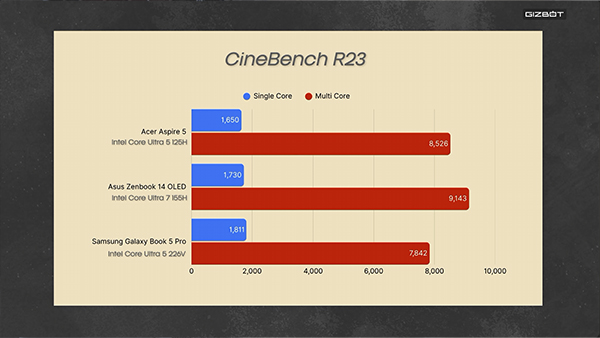
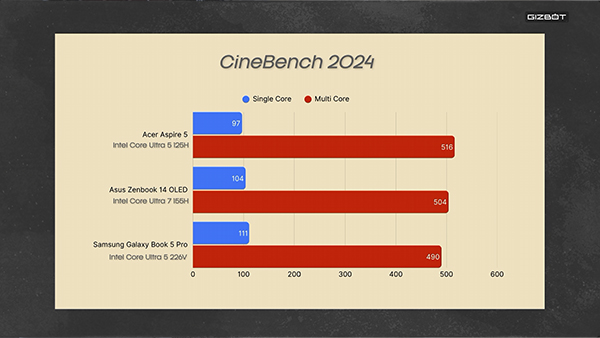
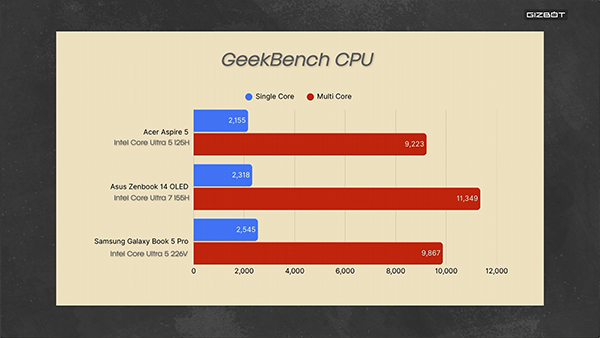
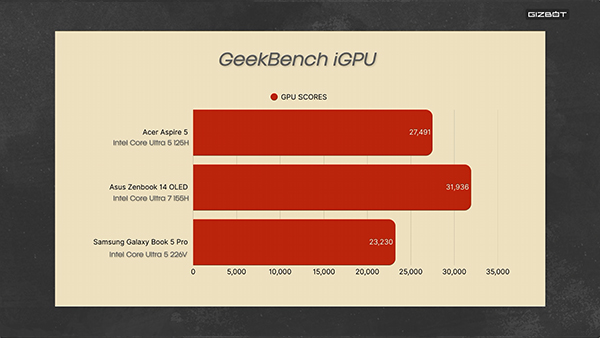
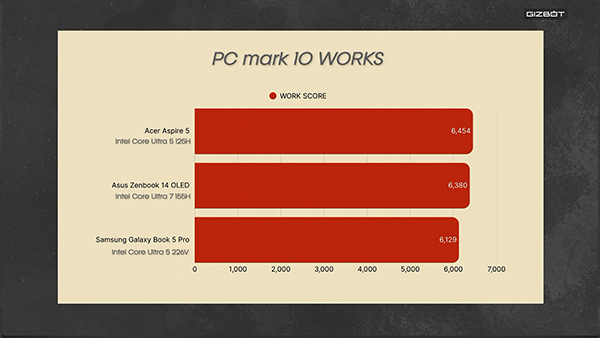
Acer Aspire 5 Review: Battery Life
The Aspire 5 has a 54Whr battery, which is neither generous nor stingy. It sits somewhere in the middle, and in practice that gets you around half a workday before you're looking for a charger.
My own use was mostly at a desk with a plug within reach, so it never really became a problem for me. But if your day involves long stretches away from a socket, this is worth factoring in.
Acer includes a 65W Type-C charger in the box. Since the laptop charges over PD, you can leave that at home and pick up a good GaN charger instead, which is what I'd suggest if you're carrying this around daily. A full charge takes around an hour and 45 minutes.
/img/2026/08/cs-1786880384.jpg)
Acer Aspire 5 Review: Verdict
My advice on this one is straightforward. At ₹76,999, Acer has put the money in the right places, but getting into this segment meant cutting somewhere, and that somewhere is the display. Whether that's the right call or the wrong one depends entirely on who you are.
If you're a student or heading into college and you want something light and durable that can handle notes, browsing, coding and light photo or video editing, this is a useful laptop at the price. The H-series processor gives you enough performance out of a body this thin, and the 1.2kg weight makes a real difference when you're carrying it every single day. The ports are the underrated part of the package, and I still haven't needed a dongle with it.
There are things to go in clear about, though. The RAM is soldered, so 16GB is where you'll stay for the life of this laptop. The display is average and it's stuck at 60Hz. If the screen is the thing you care about most, there are OLED options floating around this price, but they'll hand you a weaker processor in return, so you're picking your compromise either way.
For a reliable machine to get through college and work, the Aspire 5 is a good choice in this segment.
| Attributes | Notes | Rating |
|---|---|---|
| Design and Build | 2.8/5 | |
| Ports and Connectivity | 5/5 | |
| Display | 2.5/5 | |
| Keyboard and Trackpad | 3.5/5 | |
| CPU Performance | 4/5 | |
| Battery Life | 3.5/5 |
-
 54,999
 -
 99,999
 -
 1,44,900
 -
 89,998
 -
 46,500
 -
 57,998
 -
 53,989
 -
 1,59,999
 -
 1,29,999
 -
 99,999
-
 70,499
 -
 1,56,900
 -
 1,30,990
 -
 17,084
 -
 16,999
 -
 30,999
 -
 9,999
9,999 -
 79,900
 -
 8,999
8,999 -
 79,999
-
 20,999
 -
 37,999
 -
 25,999
 -
 31,999
 -
 24,999
 -
 10,999
 -
 15,999
 -
 45,999
 -
 19,499
 -
 1,61,999
-1763362932432.svg)

 Continue with Google

