


 Click it and Unblock the Notifications
Alienware 16X Aurora Review: The 30th Anniversary Laptop That Almost Gets Everything Right

So Alienware turned 30 this year, and Dell celebrated by dropping three new laptops in India: two Area-51 models and the 16X Aurora I've been testing. The Aurora starts at Rs 1,76,990, which is roughly half what the Area-51 siblings cost.
The big shift this generation is the AW30 design language. On the flashy Area-51 models, that means Liquid Teal paint and a Gorilla Glass window on the bottom. On the 16X Aurora, it's pared back: satin Interstellar Indigo, no glass, no rear thermal shelf. Cleaner and easier to carry.
That's the easy part of this review. The harder part is figuring out what to make of everything else. Spec-wise, my Core Ultra 9 and RTX 5070 unit was loaded. Experience-wise, it was complicated. Here's the full breakdown.

Alienware 16X Aurora Review: Two-Minute Review
The Alienware 16X Aurora is the laptop Alienware needed to make for its 30th anniversary. Not the most powerful machine in the lineup, but the one that actually makes sense for most people. The display is excellent, the speakers surprised me, and the Core Ultra 9 never got in the way of anything. Forza Horizon 6 is an absolute joy on this machine, and Doom scales brilliantly with DLSS Frame Gen.
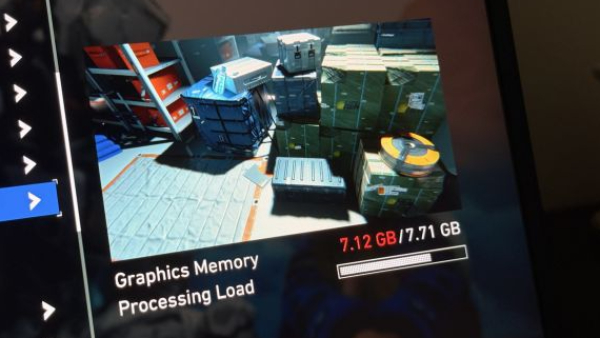
The RTX 5070 has limits though, and in 2026 you'll find them. Path tracing is off the table, 8GB VRAM is already getting flagged in demanding titles, and that's as much an Nvidia problem as it is an Alienware one. But it's still your money.
For most people shopping in this segment in India, it's the Alienware to buy. Just go in knowing what the GPU can and can't do.
Alienware 16X Aurora Review: Display
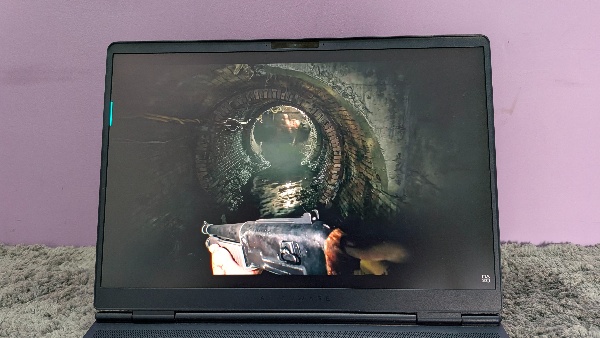
Let's start with the good news: this is one of the better displays I've used on a gaming laptop at this price. The 16-inch WQXGA panel runs at 240Hz, covers 100% DCI-P3, hits 500 nits brightness, and has a 3ms grey-to-grey response time. On paper that's strong. In practice it feels even better.
Gaming is smooth. Fast games like Doom benefit from the 240Hz refresh in ways you can actually feel, not just read about in a spec sheet. The 2560 x 1600 resolution is a sweet spot for the RTX 5070, giving you sharpness without punishing the GPU too hard. G-SYNC keeps everything clean when frame rates fluctuate.
What I didn't expect was how much I'd enjoy this panel for everyday content. I watched a fair amount of YouTube and a few movies on it, and the experience was genuinely good. Colors are vivid, images feel layered and rich, and the DCI-P3 coverage makes a real difference for anything color-graded well. It's not OLED, so blacks won't blow you away, but the IPS quality here is well above average. I never once found myself wishing I was watching on a different screen.
Brightness is handled well too. My usual work setup has sunlight coming in from the side, and I keep my laptops at full brightness all day, from morning to evening. The 500 nits kept the image clear and comfortable throughout. The anti-glare coating did its job without washing out colors. No eye strain, no fighting the light. It just worked.
At Rs 2,12,490 for this config, you're not compromising on the display. Not even close.

Alienware 16X Aurora Review: Design and Build
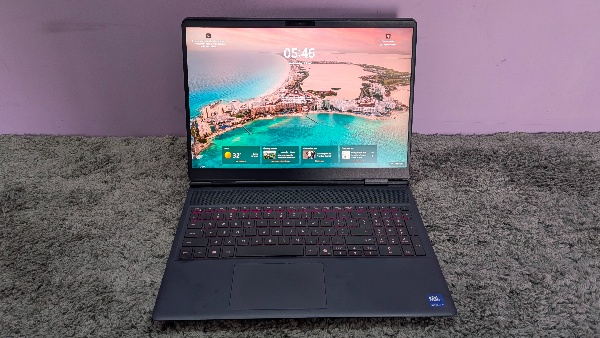
Pick up the 16X Aurora and the first thing you notice is that it doesn't feel like a gaming laptop. The satin Interstellar Indigo finish is calm, the aluminum chassis feels solid, and the smooth contours make it comfortable to hold for long sessions. It's a grown-up design.
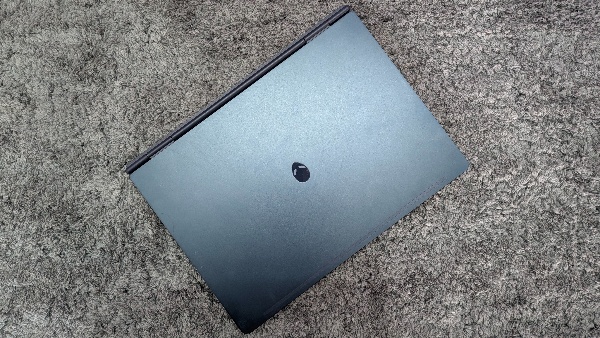
The AW30 language that runs through the whole anniversary lineup is toned down on the Aurora compared to the Area-51 models. No Gorilla Glass window, no Liquid Teal paint, no RGB everywhere. Just clean lines, an iridescent alien-head logo on the lid, and a magnesium alloy interior frame that adds rigidity without bulk.
The decision to drop the rear thermal shelf makes a real practical difference. The laptop sits flatter, fits better in bags, and doesn't have that awkward rear overhang that older Alienware designs carried. The chamfered front edge and well-engineered hinge make opening the lid a one-handed, one-motion thing.
One honest callout: the keyboard deck uses plastic rather than metal. It's not something you'd notice casually, but you'll feel it if you're used to all-metal interiors.
Alienware 16X Aurora Review: CPU Performance
The Core Ultra 9 275HX doesn't ask for attention, and that's the best thing you can say about a processor. It's a 24-core chip with 36MB cache and P-cores boosting to 5.4 GHz. It's the top option Alienware offers on the 16X Aurora, and during this entire review period it never once felt like a limitation.
The laptop passed every real-world test I put it through. Thirty-plus Chrome tabs open, Steam downloading games in the background, music playing, apps switching constantly. It didn't flinch. Everything stayed fast and responsive, and at no point did I feel like the processor was the reason anything slowed down.
| Benchmark | Score |
| PCMark 10 | 9,713 |
| Geekbench 6 Single-Core | 2,718 |
| Geekbench 6 Multi-Core | 17,527 |
The numbers confirm what the day-to-day experience suggests. A PCMark 10 score of 9,713 is strong for a laptop at this price, and the Geekbench multi-core result of 17,527 reflects a chip that's genuinely built for sustained performance, not just burst workloads.
For gaming, the CPU pairs cleanly with the RTX 5070. There's no bottleneck you'll notice, no frame pacing issues you can trace back to the processor. It's doing its job quietly and consistently.
This is a chip you can rely on. For the kind of heavy multitasking most people do alongside gaming, it handles everything without complaint.
/img/2026/06/pxl-20260603-122407245-wise-1780562840455-600x338-1780562846.jpeg)
Alienware 16X Aurora Review: GPU Performance
Geekbench 6 put the RTX 5070's GPU score at 138,969. But synthetic numbers only tell part of the story, so let's talk about the games.
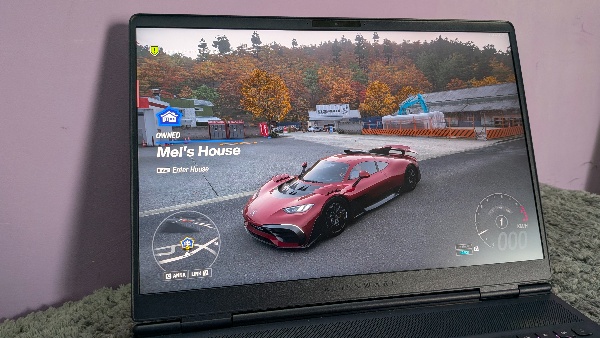
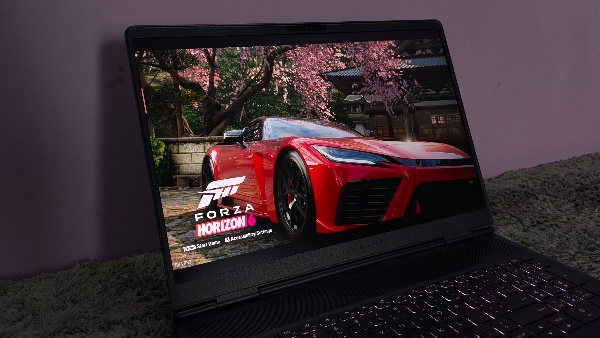
Forza Horizon 6 was the most enjoyable test by a distance. It's the newest game in this lineup and honestly one of the most fun racing games I've played in years. High settings with Ray Tracing and DLSS Quality at 1440p averaged 71 FPS with barely any micro stutters. It felt smooth, looked stunning, and the 240Hz display made every race feel alive. The sweet spot is High RT with DLSS Performance at 81 FPS, and once you find it you won't want to stop playing. There's one frustrating issue though: the game crashed every time I had hardware-based GPU scheduling turned on. I tried everything I could think of, but turning it off was the only fix, and that killed frame generation along with it. I still haven't figured out what's causing it.
Doom: The Dark Ages averaged 71 FPS at 1440p with DLSS Quality and Ray Tracing on at Medium settings. With DLSS Frame Gen the numbers scale impressively: 2X gets you to 145, 3X to 205, and 4X to 247 FPS with 1% lows still holding at 110. Path Tracing was a completely different story. The moment I turned it on the laptop just bogged down, dropped to 14 FPS with 1% lows of 7, and the game became genuinely unplayable. It wasn't a settings problem I could tune my way out of. The RTX 5070 simply can't do path tracing, and that's something you need to know going in.
Subnautica 2 in early access averaged 51 FPS at 1440p with Epic graphics and DLSS Quality, jumping to 71 with DLSS Performance. For a game still being actively built, it ran well and looked beautiful on this panel. I'm genuinely looking forward to the full release.
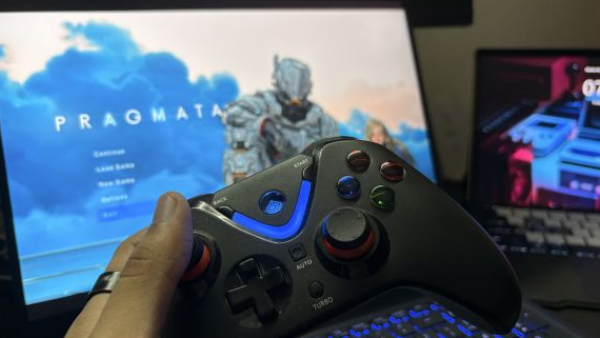
We also tested Pragmata on the 16X Aurora, and we have a dedicated performance review up on the site that goes deep into every setting and config if you want the full breakdown. The short version: with the right tuning it runs well, but it immediately flagged a VRAM overflow at 1080p with Ray Tracing and Path Tracing both on. The 8GB limit shows up fast in this game.
| Game | Settings | Avg FPS | 1% Lows |
| Forza Horizon 6 | 1440p, High + RT, DLSS Quality | 71 | N/A |
| Forza Horizon 6 | 1440p, High + RT, DLSS Performance | 81 | N/A |
| Doom: The Dark Ages | 1440p, Medium, DLSS Quality, no frame gen | 71 | 49 |
| Doom: The Dark Ages | 1080p, DLSS Frame Gen 2X | 145 | 50 |
| Doom: The Dark Ages | 1080p, DLSS Frame Gen 3X | 205 | 83 |
| Doom: The Dark Ages | 1080p, DLSS Frame Gen 4X | 247 | 110 |
| Doom: The Dark Ages | 1440p, path tracing, DLSS Perf 4X | 14 | 7 |
| Subnautica 2 (preview) | 1440p, Epic, DLSS Quality | 51 | 28 |
| Subnautica 2 (preview) | 1440p, Epic, DLSS Performance | 71 | 54 |
| Pragmata | 1920x1440, DLSS Quality, MFG 3X, RT on, PT off | 182 | 82 |
| Pragmata | 1920x1440, PT on, MFG off | 53 | 6 |
And that brings me to the 8GB VRAM conversation, because it's one I keep coming back to with this GPU. Right now, with the right settings and DLSS doing its job, the RTX 5070 handles everything well enough. But I'm genuinely concerned about where this is heading.
Games are getting heavier every year, Pragmata already recommends 12GB, and Doom's path tracing brought the whole system to its knees. The RTX 5070 isn't a budget card. It sits in the middle of Nvidia's stack, and it's priced accordingly. At this tier, 8GB is starting to feel like a decision that ages poorly. 12GB should be the baseline, not something you pay a premium to get on the Ti variant.
Alienware 16X Aurora Review: Keyboard and Trackpad
The keyboard is a 1-zone AlienFX RGB membrane setup with 1.4mm key travel and a full number pad. For everyday typing it's genuinely good. The keys are clicky, the shallow travel helps speed, and long typing sessions don't feel tiring. For productivity work this keyboard is completely dependable and I have no complaints there.
Gaming is where the layout starts showing its limitations. The arrow keys are smaller than they should be, and Page Up and Page Down are squished into the same cluster with the same design as the arrows. As a lefty who uses arrow keys instead of WASD, I kept hitting the wrong key mid-game without meaning to. The only real workaround was switching to a controller, which I ended up doing for most gaming sessions. If you're a WASD player this probably won't bother you at all, but it's worth knowing if you're not.
The RGB lighting looks great, and Alienware Command Center gives you full control over colors and effects. Stealth Mode via F7 quietly dials back the fan noise, which is a genuinely useful feature when you're working in a quieter setting or on a call.
The trackpad is where I have a real gripe. It works fine functionally, gestures are smooth and accurate, but it's small for a chassis this size. At 115 x 70mm it's one of the more compact trackpads I've used on a 16-inch laptop. Alienware had the real estate to go bigger here and didn't use it. On a machine this capable that feels like a missed opportunity.
/img/2026/06/pxl-20260603-121626466-wise-1780563160327-600x338-1780563165.jpeg)
Alienware 16X Aurora Review: Battery Life
Let's be real: nobody buys a gaming laptop with an RTX 5070 and a 240Hz display for battery life. And the 16X Aurora doesn't try to pretend otherwise. Under heavy load with the display running at native resolution, full brightness, and an external monitor connected, it lasted about 85 minutes before I had to reach for the charger.
You can squeeze more out of it by dialing down the refresh rate and dropping brightness, but honestly I rarely use gaming laptops unplugged in the first place. It's just not how these machines are meant to be used.
What saves the story is how quickly it charges. From 20% it was back to 88% in about 50 minutes on the 280W brick. So even if you do run it down, you're not waiting long to get back in the game.
Just keep the charger nearby. That's the only battery advice this laptop needs.
Alienware 16X Aurora Review: Ports and Connectivity
The port selection is well thought out. On the left you get RJ-45 Ethernet, a USB-A 3.2 Gen 1, and a headset jack. The back is where most of the action is: power input, another USB-A 3.2 Gen 1, two USB-C ports (one with Thunderbolt 4 through the dGPU, one through the iGPU), and HDMI 2.1. Having the power and HDMI at the back is the right call for cable management while gaming. No cables snaking across your desk from the sides.
Wireless is Wi-Fi 7 with Bluetooth 5.4, which is exactly what you'd want in 2026. Wired Ethernet is there for when you need a stable connection for competitive gaming, and it's good to see Alienware didn't drop it in the name of making the chassis thinner.
No SD card slot, which some people will miss. But for a gaming laptop at this price the overall port layout is practical and complete.
/img/2026/06/pxl-20260603-121558440-wise-1780563343242-600x338-1780563347.jpeg)
Alienware 16X Aurora Review: Software / Extras
The Alienware Command Center handles everything from power profiles to AlienFX lighting, and it works well. Switching between Balanced, Performance, and Overdrive is straightforward, and the per-profile customisation gives you enough control without overwhelming you.
The speakers deserve a proper mention here. They're front-facing, sitting just above the keyboard, and they're genuinely good. Good enough that I skipped the headphones during Forza sessions more than once. Movies and YouTube sound clean and full, and Dolby Atmos gives you some tuning flexibility on top. Bass is the weak point, as it always is with laptop speakers, but for gaming and casual content consumption these are among the better built-in speakers I've heard on a gaming laptop. The bar for laptop audio is admittedly low, but the 16X Aurora clears it by a comfortable margin.
The FHD IR camera with Windows Hello works reliably for facial recognition login, which is a small but appreciated convenience. Dual-array microphones are present too, though most serious gamers will be on a headset anyway.
/img/2026/06/pxl-20260603-121926701-wise-1780563409674-600x338-1780563420.jpeg)
Alienware 16X Aurora Review: Value for Money
At Rs 2,12,490 for the Core Ultra 9 and RTX 5070 config, you're paying the Alienware tax, and you know it going in. You can find RTX 5070 laptops from other brands just under Rs 2 lakhs, so that extra premium is entirely for the AW30 chassis, the display quality, the build materials, and the Alienware name on the lid.
My issue here isn't really with the 16X Aurora specifically, though. It's with the RTX 5070 itself. 8GB of VRAM at this tier is a problem regardless of which laptop it sits in, and the RTX 5070 Ti with 12GB costs significantly more across the board. So you're stuck in an uncomfortable middle ground: the RTX 5070 feels like too little VRAM for a premium laptop in 2026, and the step up to fix that costs a meaningful chunk more. That's an Nvidia problem as much as it is an Alienware one, but it's still your money on the table.
/img/2026/06/pxl-20260603-122430391-wise-1780563468744-600x338-1780563473.jpeg)
Alienware 16X Aurora Review: Verdict
The Alienware 16X Aurora is the most complete gaming laptop Alienware has made in years, and the AW30 design language was worth the wait. The Core Ultra 9 275HX is a chip that never gets in your way, the display is genuinely excellent for both gaming and everyday use, and those front-facing speakers will surprise you.
The 8GB VRAM on the RTX 5070 is a concern I can't shake, not because it struggles today but because of where games are heading, and you're paying the Alienware tax on top of a GPU I already have reservations about regardless of the laptop it's in.
But if the design speaks to you, if you want a 16-inch gaming machine that looks as good in a coffee shop as it does on a desk, and if you're willing to tune your settings rather than just max everything out, the 16X Aurora will reward you.
| Attributes | Notes | Rating |
|---|---|---|
| Display | Display | 4/5 |
| Design and Build | Design and Build | 4/5 |
| CPU Performance | CPU Performance | 4.5/5 |
| GPU Performance | GPU Performance | 4/5 |
| Keyboard and Trackpad | Keyboard and Trackpad | 3/5 |
| Battery Life | Battery Life | 3/5 |
| Ports and Connectivity | Ports and Connectivity | 4/5 |
| Software / Extras | Software / Extras | 3.5/5 |
| Value for Money | 3.5/5 |
Buy It If
- You want the Alienware look, feel, and build quality in a laptop that's actually portable
- You want a gaming laptop that doesn't look like one in a coffee shop or office
- You value a display that's just as good for movies and content as it is for gaming
- You're happy tuning settings and working with DLSS to get the best out of the hardware
Don't Buy It If
- You're purely chasing GPU performance per rupee, there are cheaper RTX 5070 laptops under Rs 2 lakhs
- You can stretch your budget further, because at that point you might as well look at an RTX 5070 Ti config and get a healthier 12GB of VRAM
-
 1,29,999
 -
 22,999
 -
 64,999
 -
 99,999
 -
 29,999
 -
 39,999
 -
-
 63,999
 -
 1,56,900
 -
 96,949

-
 1,39,900
 -
 1,29,900
 -
 79,900
 -
 65,900
 -
 12,999
 -
96,949
-
 16,499
 -
 38,999
 -
 30,700
 -
 49,999
-
 19,999
 -
 17,970
 -
 21,999
 -
 13,474
 -
 18,999
 -
 22,999
 -
 19,999
 -
 17,999
 -
 26,999
 -
 5,999
5,999
-1763362932432.svg)

 Continue with Google

