


 Click it and Unblock the Notifications
Alienware 18 Area 51 Review: A Laptop Masquerading as a Portable Gaming Desktop

Dell recently sent me an Alienware laptop, and it instantly brought back a wave of nostalgia, reminding me of a time when gaming machines embraced their identity instead of trying to squeeze desktop-class power into slim notebook designs.
The Alienware Area-51m was one of the first gaming laptops I reviewed back in 2019. And despite having to lug around nearly 7kgs of laptop (adapter included) to work and back, it was easily one of my most memorable experiences, making the sight of the Alienware 18 Area-51 feel like a full-circle moment.

Alienware 18 Area 51: Two-Minute Review
- Nostalgic design embraces bold, unapologetic gaming aesthetics
- Massive, heavy build prioritises performance over portability
- Premium materials deliver sturdy, high-quality construction
- Excellent keyboard with satisfying feedback and RGB customisation
- Large 18-inch display enhances immersion and smooth gameplay
- Strong colour accuracy suits gaming and content creation
- Desktop-class CPU and GPU deliver exceptional performance
- Handles AAA titles smoothly with consistently high frame rates
- Efficient cooling system maintains stable temperatures under load
- Battery life remains poor, limiting usage away from power sources
The Alienware 18 Area-51 is a no-compromise gaming machine that prioritises raw power above everything else. It delivers exceptional performance, a highly immersive display, and reliable thermals, making it ideal for gamers and creators who demand the best. However, its bulky design and limited battery life make it strictly a desk-bound system. At its premium price, it's clearly not meant for everyone-but for those seeking a true desktop replacement, it stands out as one of the most powerful options available today.
Alienware 18 Area 51: Ports and Connectivity
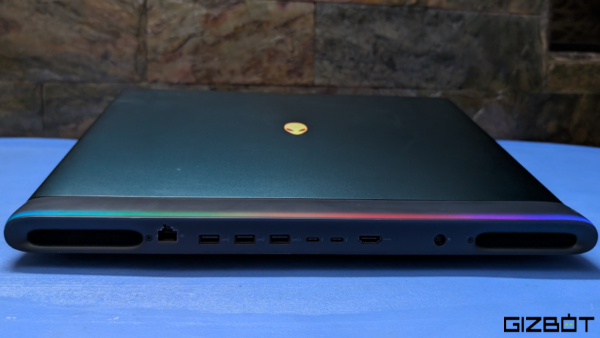
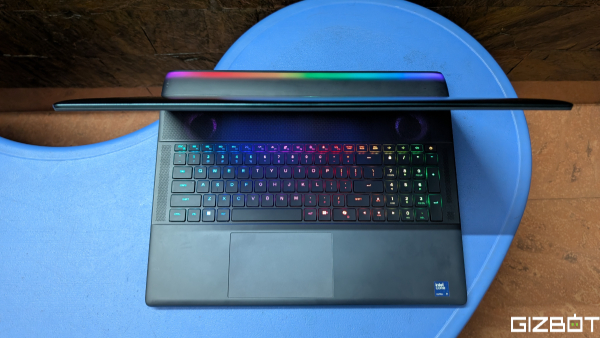
It's nice to see Dell isn't pulling any punches with the Alienware 18 Area-51's design. It's nice to see that the Area-51m inspired futuristic design is here to stay, with zero concerns about portability or subtility. The new Alienware 18 Area-51 screams gamer at first glance with an RGB LED keyboard, logo, and fans. Another slick piece gamer-first aesthetic is the RGB lights from within the chassis reflecting on the rear bar, which houses the ports.
The Area-51 comes in at just under 10 pounds without the bulky charging brick, while measuring 0.95 inches thick. The Area-51 perfectly blends an anodized aluminium lid with a high-quality plastic chassis. There's almost no flex on the screen and keyboard deck, while the overall build feels quite sturdy. Despite technically being a laptop, the Alienware 18 Area-51 is far from practical for lap use. This is a machine that's clearly built for desk-bound gaming, not for users who need portability on the go.
There's no shortage of ports on the Alienware 18 with most of them sitting on the back. An audio jack and a full-size SD card slot sit on the right, while the left is clean. You'll find two Thunderbolt 5 ports, three USB Type-A 3.2 Gen 1 ports, an RJ-45 Ethernet port, and an HDMI 2.1 port on the back. Wireless connectivity options include Wi-Fi 7 and Bluetooth 5.4.
Alienware 18 Area 51: Keyboard and Trackpad
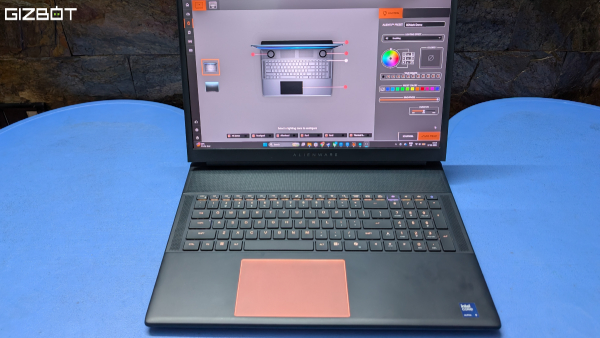
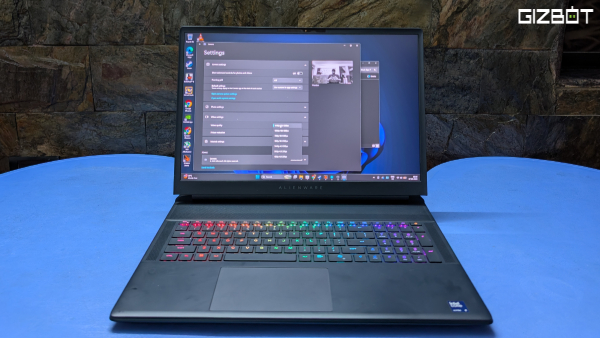
The keyboard on the Alienware 18 is one of the best I've used on a laptop to date. I was a little concerned about transitioning from a mechanical keyboard, but the shift was seamless. It even helped me achieve my highest-ever rank in Marvel Rivals. The full-size layout makes the most of the 18-inch chassis, offering excellent key travel, crisp feedback, and well-balanced per-key RGB lighting that's bright without being distracting. It feels comfortable whether you're gaming or typing long stretches, with no sense of cramped keys.
The lighting ties neatly into Alienware Command Centre for easy customisation. The touchpad is equally impressive, large, smooth, and accurate, with reliable gesture support and a premium click feel. While most gamers will still reach for a mouse, it's good to see it doesn't feel like an afterthought, complete with subtle RGB lighting underneath for that signature flair.
Alienware 18 Area 51: Display
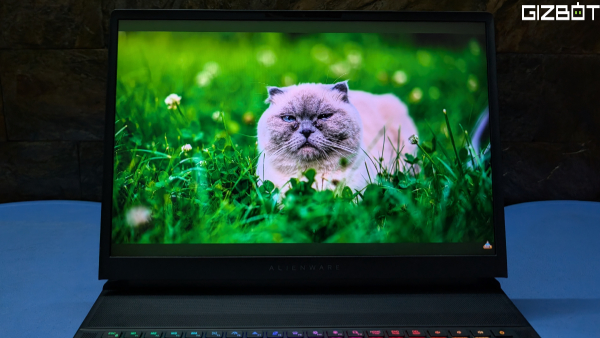
Moving on to the display, the 18-inch WQXGA (2560×1600) IPS panel is easily one of the Alienware 18 Area-51's standout features. The sheer size alone makes a huge difference to immersion, especially in games that benefit from a larger field of view, while the 300Hz refresh rate keeps everything feeling incredibly smooth in fast-paced titles.
Colour reproduction is equally impressive, with 100% DCI-P3 coverage making it more than capable for content creation as well. Brightness tops out at 500 nits, which is plenty for indoor use, and G-SYNC support helps deliver a tear-free gaming experience.
This isn't an OLED or mini-LED panel, so blacks aren't as deep, but that feels like a conscious trade-off in favour of consistency and performance. For the target audience, that's unlikely to be a dealbreaker. The end result is a display that's big, sharp, and fluid, fitting perfectly with the laptop's unapologetically gaming-first approach.
Alienware 18 Area 51: Performance
When it comes to power, Dell doesn't hold back with the Alienware 18 Area-51. This laptop is equipped with an Intel Core Ultra 9 275HX CPU and an Nvidia RTX 5090 Laptop GPU. Accompanying this powerful combination is paired with 64GB of DDR5 RAM and 2TB NVMe M.2 PCIe Gen5 SSD storage. Let's look at some real-world results.
The Intel Core Ultra 9 275HX delivers exceptional multi-core performance with strong single-core results, making it ideal for demanding workloads and high-end gaming. While sustained scores show some expected throttling under prolonged stress, overall performance remains consistently high. This is a true desktop-class processor in a laptop form factor.
Alienware 18 Area 51 Benchmark Results!
Full Review Here⤵️https://t.co/9Ic9kiizEP pic.twitter.com/ahooXVqYF3
— Carlsen (@Carlsen0491) March 25, 2026
The RTX 5090 Laptop GPU delivers top-tier performance across synthetic and compute benchmarks, comfortably handling 4K gaming and heavy ray tracing workloads. Scores across 3DMark and Vulkan tests highlight its flagship positioning, making it one of the most powerful mobile GPUs currently available with excellent consistency under load.
Geekbench AI
• Single Precision: 5,090 points
• Half Precision: 1,944 points
• Quantized Score: 9,163 points
AI performance is solid, particularly in quantized workloads, indicating good support for on-device AI tasks. However, the relatively lower half-precision score suggests optimisation still depends heavily on software. While capable, the hardware's full AI potential is yet to be fully realised in real-world applications.
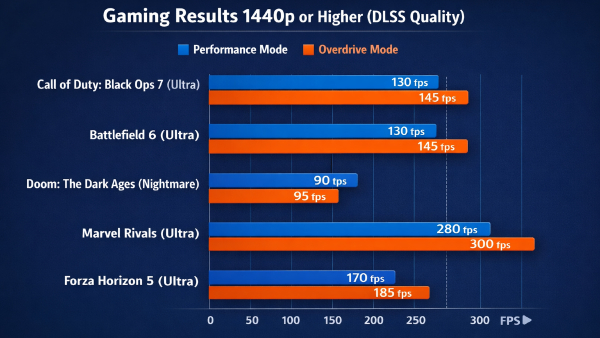
Gaming performance is equally impressive, with the RTX 5090 Laptop GPU delivering consistently high frame rates at 1440p and above. Even demanding titles like Doom: The Dark Ages run smoothly near 100fps, while competitive games such as Marvel Rivals push well past 250fps, making full use of high refresh rate displays. The gains from Performance to Overdrive Mode are present but modest, indicating strong baseline optimisation. Overall, the system handles modern AAA titles with ease, offering a fluid, high-fidelity gaming experience with enough headroom for future releases.
Alienware 18 Area 51 Gaming Test:#MarvelRivals#CallofDuty#DoomDarkAges #Intel Core Ultra 275HX CPU #Nvidia RTX 5090 GPU
Full Review Here⤵️https://t.co/9Ic9kiizEP pic.twitter.com/4L3uSjbE1X
— Carlsen (@Carlsen0491) March 25, 2026
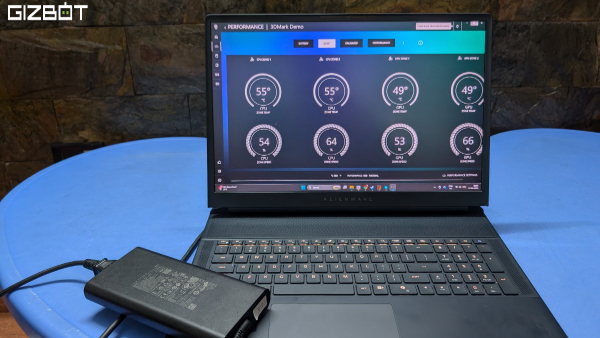
The hardware on the Alienware 18 is backed by Cryo-Tech cooling technology. The laptop is combines dual fans, heap pipes, and several vents to effectively manage airflow and keep temperatures in check. During my extended gaming sessions, the Area-51's CPU stayed at around 75°C, while the GPU's temperature never crossed 70°C. The cooling system does a commendable job of maintaining thermal stability, even under sustained, heavy workloads.
Alienware 18 Area 51: Battery Life
The Alienware 18 packs a massive 96 Whr battery, although I set expectations very low considering the extremely powerful CPU and GPU here. So I wasn't really disappointed when I got a little over two hours browsing the web and using MS Word. Again, I didn't bother gaming on the battery, but don't expect more than an hour if you do. Charging is relatively quick, and the hefty power brick ensures the system has more than enough power to deliver peak performance under load.
Alienware 18 Area 51: Software / Extras
The speakers on the Alienware 18 Area-51 are good enough for casual gaming and media consumption, delivering clear audio with sufficient loudness for most scenarios. They won't replace a dedicated headset, though, especially for immersive gaming. That said, most users in this segment will likely be using headphones anyway, particularly when the fans ramp up under load. For everyday use, the speakers hold up well, with the only real shortcoming being a lack of deep, punchy bass.
The Alienware 18 Area-51 also features an IR camera with support for Windows Hello, offering quick and reliable facial recognition for secure logins. Alongside it, the 8MP UHD HDR webcam stands out with sharp detail and well-balanced exposure, making it a solid choice for video calls and presentations. While the IR camera handles authentication duties efficiently, it's the primary camera that delivers a noticeably better overall image quality for everyday use.
Alienware 18 Area 51: Value for Money
The Alienware 18 Area-51 fetches a starting price of Rs 337,390 for the RTX 5070 Ti, although our model will set you back Rs 519,390, which is the price of a small car. There's no doubt that the Alienware 18 is extremely expensive, second only to the MSI Titan 18, which costs Rs 587,990.
We did find other RTX 5090 gaming laptops from HP (Omen Max), Gigabyte (AORUS Master 16), Lenovo (Legion Pro 7), Asus (ROG Strix SCAR 16/18), and Acer (Predator Helios 16), all available under the 5-lac mark, although it is impossible to tell if they will deliver similar results to this Alienware monstrosity.
Yes, the Alienware 18 Area 51 does offer a no compromise approach to performance. But no; it doesn't offer good value for money.
Alienware 18 Area 51: Verdict
The Alienware 18 Area-51 feels like a throwback to when gaming laptops unapologetically prioritized power over practicality-and that's exactly its strength. It delivers desktop-class performance, a stunning high-refresh display, and rock-solid thermals, making it a dream machine for serious gamers and creators.
The Alienware 18 Area 51's sheer size, weight, and limited battery life make it strictly a desk-bound setup rather than a portable companion. At 5.2 lacs, it's undeniably expensive, but for those who want top-tier performance without compromise, this machine justifies its price. It's not for everyone, but if you're the target audience, there's very little else like it.
| Attributes | Notes | Rating |
|---|---|---|
| Ports and Connectivity | A Desktop Replacement That Looks the Part | 4/5 |
| Keyboard and Trackpad | A Surprisingly Seamless Shift from Mechanical | 4.5/5 |
| Display | A No-Nonsense Display That Gets the Job Done | 3.5/5 |
| Performance | All-Out Performance with Minimal Thermal Compromise | 5/5 |
| Battery Life | Built for Power, Not Endurance | 1/5 |
| Software / Extras | Decent Speakers Paired with a Sharp Webcam | 4/5 |
| Value for Money | Unmatched Performance, But Far From a Value Buy | 2/5 |
Buy It If
If you're someone who just wants raw, no-compromise performance, the Alienware 18 Area-51 absolutely delivers. This thing is basically a desktop in laptop form, thanks to the Core Ultra 9 CPU and RTX 5090 GPU. It chews through AAA games, handles ray tracing effortlessly, and doesn't break a sweat with heavy workloads. The massive 18-inch 300Hz display makes gaming feel incredibly immersive, while the cooling system keeps performance stable even during long sessions. Add to that a fantastic keyboard, premium build, and tons of ports, and you've got a machine that's built for serious gamers and creators.
Don't Buy It If
This isn't a laptop for everyone, and it doesn't try to be. It's huge, heavy, and clearly meant to sit on a desk rather than travel with you. Battery life is pretty underwhelming too, barely lasting a couple of hours for basic tasks and dropping even faster while gaming. For something this expensive, the lack of an OLED or mini-LED display might also feel like a miss. And then there's the price-₹5.2 lakh is a serious investment. Unless you truly need this level of performance, there are far more practical (and affordable) options out there.
-
 1,29,999
 -
 22,999
 -
 64,999
 -
 99,999
 -
 29,999
 -
 39,999
 -
-
 63,999
 -
 1,56,900
 -
 96,949

-
 1,39,900
 -
 1,29,900
 -
 79,900
 -
 65,900
 -
 12,999
 -
96,949
-
 16,499
 -
 38,999
 -
 30,700
 -
 49,999
-
 19,999
 -
 17,970
 -
 21,999
 -
 13,474
 -
 18,999
 -
 22,999
 -
 19,999
 -
 17,999
 -
 26,999
 -
 5,999
5,999
-1763362932432.svg)

 Continue with Google

