


 Click it and Unblock the Notifications
ASUS ROG Flow Z13 (Kojima Limited Edition) Review: Truly for the Ludens Who Dare

There are very few products that make you feel something before you've even turned them on. The ROG Flow Z13 KJP did that the moment the courier handed it over. That rigid, latched, matte white hard case with Kojima Productions branding stamped across it didn't look like a laptop box. It looked like classified equipment.
I'll be honest, opening it felt like being a kid on Christmas morning.

Inside was one of the most absurd, over-engineered, and genuinely exciting pieces of tech I've had on my desk in years. A gaming tablet built in collaboration with Kojima Productions, with a chassis sketched by Yoji Shinkawa, the legendary artist behind Metal Gear Solid and Death Stranding.

But collector appeal and flashy packaging only take you so far. I used it as my primary work machine for several days, ran benchmarks, and played actual games on it to see whether the experience holds up once the novelty wears off.
ASUS ROG Flow Z13-KJP Review: Two-Minute Review
The ASUS ROG Flow Z13 (Kojima Limited Edition) is one of the most ridiculous pieces of tech I've used in a while, and I mean that in a good way. It's a gaming tablet designed by Yoji Shinkawa, built with Kojima Productions, and priced at ₹3,79,990. On paper, it sounds like too much. In person, it just feels different.
The whole experience starts before you even power it on. The hard-shell case, the sketches, the Kojima touches everywhere, even the bundled copy of Death Stranding 2 - this doesn't feel like a normal laptop unboxing. It feels like something you'd actually want to keep.
What surprised me is how usable it is beyond all that. The performance is genuinely strong, the iGPU handles games better than it has any right to, and the detachable keyboard is way better than I expected. The tablet form factor actually works, and the 180Hz display makes everything feel smooth.
There are compromises. At this price, the lack of OLED stands out. The single USB-A port feels limiting. And yes, this is still a very expensive machine.
But that's kind of the point. This isn't about being practical. It's about wanting something that feels special every time you use it. And honestly, this is one of the few devices right now that actually does.
ASUS ROG Flow Z13-KJP Review: Display
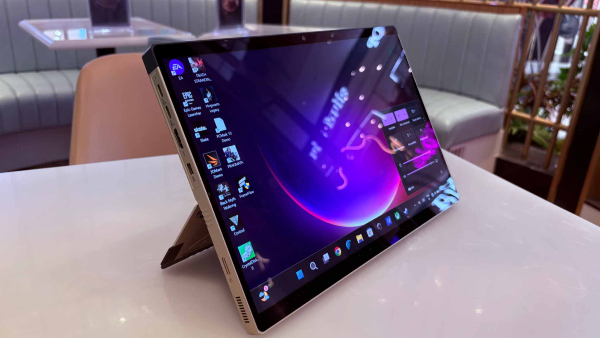
The 13.4-inch QHD+ IPS panel at 180Hz is sharp, smooth, and genuinely comfortable to use outdoors at 500 nits of brightness. Colors are accurate with full DCI-P3 coverage, and the 16:10 aspect ratio gives you more vertical real estate than most laptops, which makes a real difference in both work and content. Gaming feels fluid at 180Hz, and ASUS offers multiple display profiles through Armoury Crate if you want to fine-tune how the panel looks.
As a touchscreen tablet, it's a genuine pleasure to use. Detaching the keyboard takes seconds. The kickstand is impressively sturdy and goes very low, giving you real flexibility whether you're on a desk, your lap, or propped up in bed. The 180Hz refresh rate makes every swipe feel buttery smooth, noticeably more fluid than most tablets at this price. I found myself reaching for tablet mode more often than expected. One evening, I detached the keyboard, propped it up in bed, and watched YouTube for close to an hour. It felt natural, and that's when the appeal of a gaming tablet really clicked for me.
That same session kept reminding me of the one thing holding this display back. At this price, the absence of OLED is a real disappointment. Blacks look dark grey rather than true black, and colors, while accurate, lack the punch and depth OLED brings. Moody cinematography and dark gaming environments expose the IPS panel's limits quickly.
ASUS may have avoided OLED because the tablet design places main components directly behind the display, making heat management more complex than on a traditional laptop. An IPS panel also sidesteps OLED burn-in concerns from static HUD elements during long gaming sessions. ASUS hasn't officially confirmed either reason, so treat both as reasonable speculation.
The screen also picks up fingerprints really easily during touch use, so it gets dirty pretty fast. You'll find yourself reaching for a microfiber cloth more often than you'd like.
Lastly, the standard Z13 ships with a stylus in the box. The KJP doesn't, which is a genuine miss at this price point.
ASUS ROG Flow Z13-KJP Review: CPU Performance
The Ryzen AI Max+ 395 is AMD's most powerful mobile processor right now. 16 Zen 5 cores, 32 threads, clocked up to 5.1GHz, built on a 3nm process. What makes it genuinely different from a standard laptop chip is the unified memory architecture.
Instead of the CPU and GPU fighting over separate memory pools, the entire 128GB of LPDDR5X-8000 quad-channel RAM is shared dynamically between both. The CPU takes what it needs, the GPU takes what it needs, and there's no bottleneck between them. It's a similar philosophy to what Apple does with its M-series chips, except you're running Windows.
In daily use, that architecture makes itself known quickly. I regularly had 30+ Chrome tabs open, an external monitor connected through the HDMI port, multiple apps running, and multiple Steam games downloading in the background simultaneously. The machine didn't blink. For a tech journalist who lives in browser-heavy workflows, that kind of headroom feels genuinely luxurious rather than just a spec sheet talking point.
The 128GB pool also makes this machine seriously interesting for local AI workloads. The chip packs 50 TOPS of NPU performance, and with this much memory, it can run large language models up to 70 billion parameters entirely locally.
| Benchmark | Result |
| Geekbench 6 (Plugged In) | Single-Core: 2,881 / Multi-Core: 18,027 |
| Geekbench 6 (Battery) | Single-Core: 2,713 / Multi-Core: 16,120 |
| Geekbench AI | Single: 5,393 / Half: 2,055 / Quantized: 10,191 |
| PCMark 10 Overall Score | 9,546 |
| Storage (CrystalDiskMark) | Read: 6,391 MB/s / Write: 5,646 MB/s |
| Cinebench R23 (Turbo) | Multi-Core: 29,380 |
| Handbrake (Turbo) | 4K to 1080p: 233 seconds |
ASUS ROG Flow Z13-KJP Review: GPU Performance
The Radeon 8060S isn't a dedicated GPU in the traditional sense. It lives on the same chip as the CPU, with 40 RDNA 3.5 compute units clocked up to 2.9GHz, drawing from that shared 128GB memory pool rather than dedicated VRAM.
That shared architecture is actually a significant advantage over conventional integrated graphics: where most integrated GPUs are starved of memory bandwidth, the 8060S has access to one of the fastest and largest memory pools in any mobile chip today.
That said, this is still integrated graphics, so there are limits. I also played Pragmata on an Alienware Aurora 16X with an RTX 5070 Laptop GPU alongside the Z13 KJP, and yeah, the dedicated GPU machine is clearly ahead (check out our performance review). You do get noticeably higher FPS, and DLSS does a cleaner job than FSR here, so the overall experience feels more polished.
But the interesting part is how close this gets. The gap isn’t as wide as you’d expect on paper, and when you remember this is coming from a 1.25kg tablet, it starts feeling a lot more impressive.
| Game | Settings | Avg FPS | 1% Lows |
| Pragmata | Max settings, FSR 3 Quality, RT on, FG on | 109 | 42 |
| Death Stranding 2 | High settings | 120 | 61 |
| Death Stranding 2 | Very high settings | 100 | 52 |
| Black Myth: Wukong | Recommended preset, no FSR, no RT | 44 | 24 |
| Black Myth: Wukong | FSR 3, FG auto, RT very high, high graphics | 83 | 55 |
| Black Myth: Wukong | FSR 3, FG auto, RT very high, cinematic | 56 | 33 |
| Control | High quality, RT off | 79 | 31 |
| Control | Medium quality, RT off | 96 | 52 |
| Control | Turbo mode, high quality | 137 | 49 |

ASUS ROG Flow Z13-KJP Review: Keyboard and Trackpad
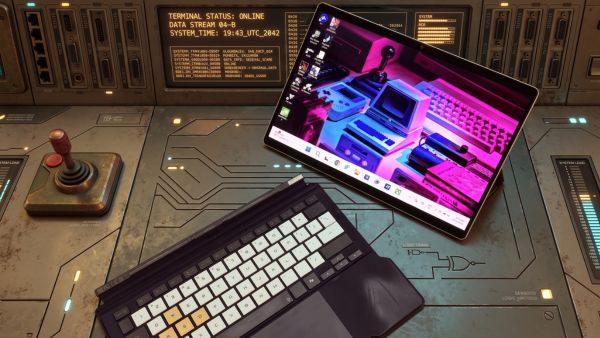
The detachable keyboard is better than any detachable has a right to be. I went in skeptical, because most detachable keyboards feel like a compromise you tolerate rather than something you actually enjoy using. This one proved me wrong pretty quickly.
Key travel is excellent. The trackpad is smooth and responsive. The gold WASD keys with Death Stranding typeface feel premium rather than gimmicky. I used this as my primary work machine for several days, spending hours writing articles daily, and I noticed fewer errors than I'd expect from a detachable setup. That's a meaningful result.
The keyboard attaches magnetically via pogo pins and stays stable during normal typing with no flex or wobble. My only complaint is the RGB lighting, which is genuinely too dim to register under normal indoor lighting. On a collector's edition machine at this price, that's a strange oversight. But it doesn't affect the actual typing experience, and that's what matters most.
ASUS ROG Flow Z13-KJP Review: Battery Life
Given how powerful this machine is, I went in expecting battery life to be genuinely terrible. It's not, provided you use it sensibly.
For light use at moderate brightness and 60Hz, you're looking at around 8 to 9 hours comfortably. Medium use, which is closer to how most people will actually use this, lands around 6 hours. Both of those numbers are respectable for a machine running this chip.
My own usage was more aggressive than most. I typically had 30+ Chrome tabs open, an external monitor connected through HDMI, keyboard RGB on, full 180Hz, and brightness maxed out. Under that workload, I was averaging around 5 hours, which honestly feels fair given everything I was asking it to do.
Gaming drains it quickly. Demanding AAA titles on Performance mode gives you roughly 80 minutes. In silent mode and battery, I ran four games across 52 minutes, going from 99% to 43% battery. Framerates dropped significantly across the board, but the fans stayed completely quiet the entire time.
Running in Silent mode on battery is actually pretty useful if you want to game in a café or on a flight without the fans making a scene. Just keep your expectations in check for heavier titles. Older or lighter games are a much better fit here and won’t drain the battery nearly as fast.
Dropping to 60Hz on battery is the single most impactful change you can make to extend runtime. Turning off the keyboard RGB helps too. USB-C fast charging gets you to 50% in about 30 minutes, which is the most practical option when traveling.
| Usage Type | Approx Battery Life |
| Light use, 60Hz, moderate brightness | 8 to 9 hours |
| Medium use, browsing, writing, streaming | ~6 hours |
| Heavy use, 180Hz, max brightness, external monitor | ~5 hours |
| Gaming, Performance mode | ~80 minutes |
| Gaming, Silent mode on battery | ~100 minutes |
| USB-C fast charge to 50% | ~30 minutes |
| Charge from 5% to 73% | ~78 minutes |
ASUS ROG Flow Z13-KJP Review: Ports and Connectivity
Unboxing
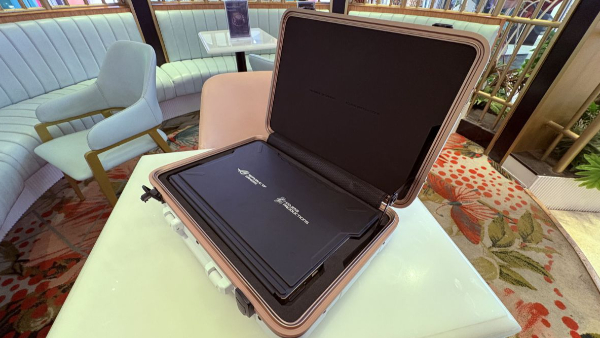
Let's talk about the unboxing properly, because ASUS absolutely went overboard here, and I mean that as a compliment.
Most laptops show up in a cardboard box with the laptop, charger, and maybe a few manuals you'll never read. The Z13 KJP feels like opening collector merchandise made for someone deep into Kojima lore.
The biggest highlight is that rigid, latched, matte white hard-shell carrying case with Kojima Productions branding stamped across it. It doesn't feel like something made to carry a laptop. It feels like you're transporting something ridiculously important.
Then there's the tablet itself, the detachable keyboard, and a charger that has Ludens artwork printed on it because apparently even the power brick needed its own personality.
And ASUS still isn't done.
You get a Ludens-themed sticker pack, a flight tag with "For Ludens Who Dare" branding on the back, and a thank-you card.
Ludens, for those unfamiliar, is the mascot of Kojima Productions. A figure in a sci-fi EVA suit combining elements of a knight and an astronaut. That design language is all over this machine.
The front of the card features Yoji Shinkawa's original developmental sketches of the Z13 KJP itself, not polished marketing art, but the actual early drawings that came before the final product.
The back carries handwritten-style personal messages from both Hideo Kojima and Shinkawa, with their signatures. These are printed reproductions, not originals. But they're the closest most people will ever get to Shinkawa's creative process for this specific device. I'd keep that card in a toploader.
Design
ASUS didn't just license the Kojima Productions name and slap a logo on a standard chassis. Yoji Shinkawa actually designed this machine from scratch, and the brief was essentially: make it look like a device Ludens would personally use.
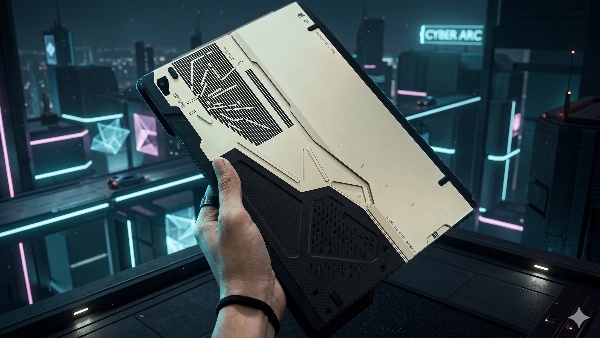
The color scheme is white and gold, what ASUS calls Decennium Gold, with black accents and genuine carbon fiber panels. The chassis is CNC-milled aluminium with angular cutouts that reference Ludens' armor.
The rear panel is almost more impressive than the front: ASUS has laser-etched the vents with a dotted beam pattern that looks like a spacecraft hull, and labelled nearly everything in a sci-fi technical style, pointing out ports, battery location, heat vents, camera lens, even the screw for the M.2 SSD slot. There are caution warnings that look borrowed from a space station manual.
The keyboard is exclusive to this edition. The WASD keys are in Decennium Gold with a Death Stranding-inspired typeface. The whole keyboard folio is white and industrial-looking, which matches the tablet beautifully.
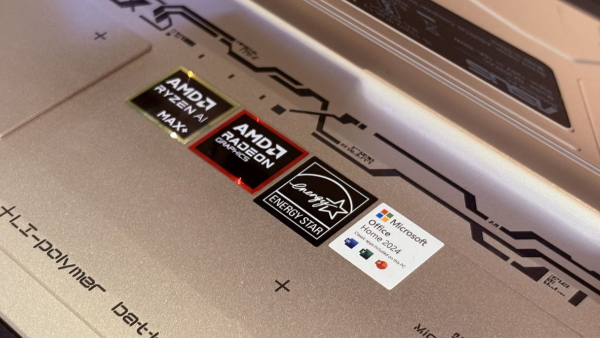
One detail most reviews don't mention: ASUS hid the standard AMD Ryzen, Energy Star, and Microsoft Office certification stickers underneath the hinge. On most laptops, those stickers sit on the palm rest and cheapen the look. Here, they're invisible. That's the level of attention this machine received.
Ports and connectivity
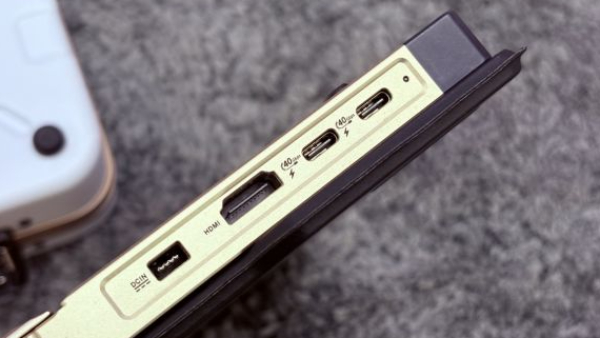
| Port | Details |
| USB4 Type-C | 2x, DisplayPort 2.1, Power Delivery 3.0 |
| USB-A | 1x USB 3.2 Gen2 |
| HDMI | 1x HDMI 2.1 |
| microSD | 1x UHS-II, under kickstand |
| Audio | 1x combo jack |
The dedicated HDMI port is genuinely useful, especially if you’re plugging into a monitor regularly. The microSD slot tucked under the kickstand is also a nice touch. The only real annoyance is the single USB-A port. My controller dongle basically lived there, and at this price, it really should’ve had at least one more.
ASUS ROG Flow Z13-KJP Review: Software / Extras
This is where ASUS went a bit overboard, in a good way. Most special editions stop at a wallpaper and a logo. This doesn't.
Armoury Crate handles the usual stuff like performance modes and fan control, but the Ludens-themed UI actually looks great and fits the whole collaboration. Redeeming the bundled Death Stranding 2 code is also seamless, a pop-up shows up on first boot and you're done in a couple of minutes. The custom boot animation and sound play every time, and they don't get old.
The speakers are fine for casual use like YouTube or Netflix, but can feel inconsistent depending on the content. For gaming, you'll still want headphones.
On cameras, the 5MP front-facing IR camera is average but gets the job done for calls, with Windows Hello working reliably and Studio Effects like auto framing and eye contact being genuinely useful. There's also a 13MP rear camera, which isn't something you'll use often, but it's handy for scanning documents or quick shots. It feels like a thoughtful addition rather than an afterthought.
My bigger frustration was Windows itself. I ran into random shutdowns, forced updates at annoying times, and occasional sleep issues where the machine refused to wake without a restart. ASUS can't fully control that, but it did take away from an otherwise polished experience.

ASUS ROG Flow Z13-KJP Review: Value for Money
The standard ROG Flow Z13 (2025) lineup starts at ₹1,99,990, and once you look at the full stack, the KJP starts to make a bit more sense.
| Model | Price | Key Specs |
| Base Flow Z13 | ₹1,99,990 | AI Max 390, 32GB RAM, 8050S |
| Mid Flow Z13 | ₹2,59,990 | AI Max+ 395, 32GB RAM, 8060S |
| Top Flow Z13 | ₹2,99,990 | AI Max+ 395, 64GB RAM, 8060S |
| Flow Z13 KJP | ₹3,79,990 | AI Max+ 395, 128GB RAM, 8060S |
On its own, ₹3,79,990 for an iGPU machine feels hard to justify. But when you compare it to the ₹2,99,990 model, the gap is about ₹80,000, and that gets you double the RAM, the custom Shinkawa-designed chassis, all the collector extras, and the bundled copy of Death Stranding 2.
That changes the conversation a bit.
If your priority is gaming, the ₹2,99,990 variant gives you the same performance for less money. And honestly, for most people, even 64GB RAM is already more than enough. There’s very little real-world need to stretch to 128GB unless you’re doing something very specific, like heavy AI workloads or extreme multitasking.
So no, there’s really no practical reason to spend this much.
But that’s also kind of the point.
This isn’t about logic. It’s about wanting something that feels different, something that stands out every time you open it, something that doesn’t look or feel like every other laptop in this price range. And if you’re that kind of buyer, this is one of the few machines right now that actually delivers on that feeling.
ASUS ROG Flow Z13-KJP Review: Verdict
The ROG Flow Z13 KJP is the most thoughtfully executed special edition product I've reviewed, and also one of the most genuinely capable machines I've used this year. The Ryzen AI Max+ 395 with 128GB unified memory is in a class of its own, the integrated GPU defied every expectation I had, and the Yoji Shinkawa design makes everything else on the market look ordinary by comparison.
The IPS panel, the single USB-A port, the battery under gaming load, and the missing stylus are real compromises. So is the price.
But if this machine speaks to something in you, it won't disappoint. Some products are just worth owning.
| Attributes | Notes | Rating |
|---|---|---|
| Display | A sharp, smooth, and touch-friendly panel that's let down only by the absence of OLED at this price. | 3.5/5 |
| CPU Performance | The Ryzen AI Max+ 395 with 128GB unified memory is the most impressive mobile processor I've tested, full stop. | 5/5 |
| GPU Performance | Integrated graphics that genuinely redefined what I thought was possible from a mobile chip without a dedicated GPU. | 5/5 |
| Keyboard and Trackpad | The best detachable keyboard experience I've used, and it's not particularly close. | 4/5 |
| Battery Life | Decent for light and medium use, but keep a charger nearby if you're gaming or pushing the machine hard. | 3/5 |
| Ports and Connectivity | Unboxing, design, ports and connectivity | 5/5 |
| Software / Extras | ASUS went so far beyond what a special edition needs to be that it almost feels unfair to every other limited edition product. | 4/5 |
| Value for Money | ₹3,79,990 is a hard number to justify on paper, but the right buyer will never question it. | 2/5 |
Buy It If
- You want a unique, collector-style device that stands out
- You value design as much as performance
- You need extreme multitasking or AI headroom (128GB RAM)
- You like the idea of a gaming tablet form factor
Don’t Buy It If
- You want the best gaming performance for the price
- You expect OLED at this price
- You're looking for practical value over something special
-
 54,999
 -
 99,999
 -
 1,44,900
 -
 89,998
 -
 46,500
 -
 57,998
 -
 53,989
 -
 1,59,999
 -
 1,29,999
 -
 99,999
-
 70,499
 -
 1,56,900
 -
 1,30,990
 -
 17,084
 -
 16,999
 -
 30,999
 -
 9,999
9,999 -
 79,900
 -
 8,999
8,999 -
 79,999
-
 20,999
 -
 37,999
 -
 25,999
 -
 31,999
 -
 24,999
 -
 10,999
 -
 15,999
 -
 45,999
 -
 19,499
 -
 1,61,999
-1763362932432.svg)

 Continue with Google

