


 Click it and Unblock the Notifications
HP OmniBook 5 Review: A Practical No-Nonsense Laptop for Students and Professionals

The HP OmniBook 5 isn't out to impress you, and it's perfectly content with that. It's a grounded, minimal machine built for people who need a laptop to show up and do the work, the college student heading between lectures, and the office goer who wants something dependable on the desk. I've been using it as my daily driver for the past week, writing video scripts, and attending meetings on it.
It's running the Intel Core Ultra 7 355, an 8-core chip paired with 16GB of LPDDR5X RAM and a 1TB SSD. At ₹1,45,999, it doesn't come cheap, but it has managed to make a case for itself in my usage. Here's my full review of the HP OmniBook 5.

HP OmniBook 5 Review: Two-Minute Review
The HP OmniBook 5 is a grounded, no-frills 14-inch laptop built for students and office goers, and at ₹1,45,999 it gets the essentials right without trying to dazzle anyone.
The star is the 14-inch 2K OLED display, which looks lovely with rich, well-tuned colours, though it's held back by a 60Hz refresh rate that feels dated at this price and a modest 300 nits of brightness. The design is clean and understated, but the plasticky materials and a bit of flex on the lid and keyboard deck don't feel as premium as the price suggests. That said, it survived being lugged around with camera gear without a scratch, so it's tougher than it feels.
Ports are a genuine highlight, with USB-A, HDMI, Thunderbolt 4 and a combo jack meaning you'll rarely reach for a dongle. The keyboard is comfortable and backlit, the trackpad is large, and battery life comfortably lasts a full workday of browser-based productivity. There's no fingerprint sensor, though, only face unlock.
On performance, the Intel Core Ultra 7 355 handles everyday multitasking smoothly. Its single-core results hold up well against pricier machines, though multi-core and graphics trail the higher-end competition, which is expected for this class
HP OmniBook 5 Review: Design and Build
The OmniBook 5 keeps things simple, and I genuinely like that about it. The design is clean and restrained, the kind of laptop that fits into a lecture hall or a meeting room without drawing a second glance, and after a while, I came to appreciate how unbothered it is about making a statement. For the student-and-office crowd it's aimed at, this understated approach makes a lot of sense.
Where my enthusiasm cools is the materials. For a laptop at this price, the OmniBook 5 doesn't feel as premium as I'd have liked. There's a noticeable bit of give on the lid if pressure is applied, and the keyboard deck flexes a little under a firm hand, both of which had me questioning how well it would hold up over the long run. While it did manage to come out harmless after a day of being in my backpack, crammed with some camera gear in the same compartment.
Still, first impressions matter, and at this price, I'd have appreciated sturdier materials that feel reassuring the moment you pick the laptop up, rather than ones that make you doubt the build until you've stress-tested it yourself.
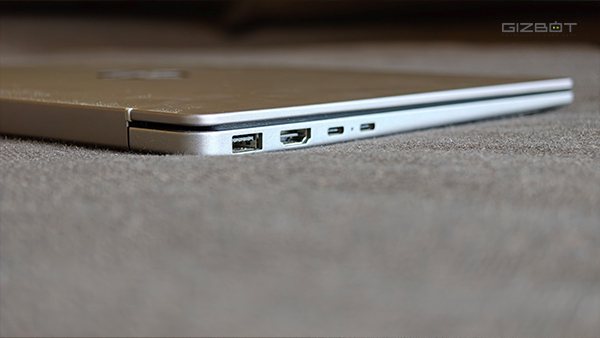
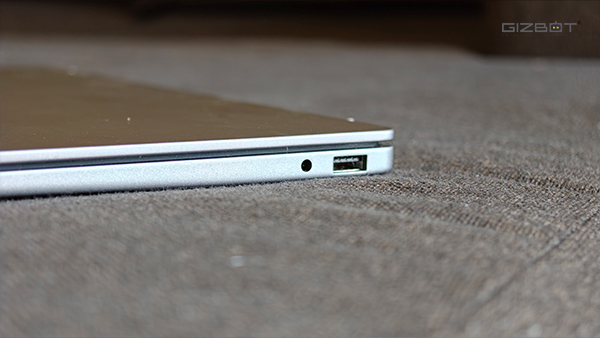
The port selection, on the other hand, is excellent. You get two USB Type-A ports, an HDMI 2.1 out, an audio jack, and two Thunderbolt 4 USB Type-C ports with Power Delivery and DisplayPort support. That covers just about anything you'd realistically plug into, and in my time with the laptop, I never once had to dig out a dongle, which is a genuine relief and something not every laptop at this price gets right.
HP OmniBook 5 Review: Display
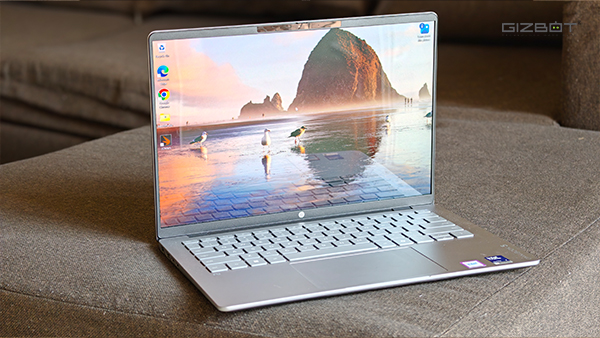
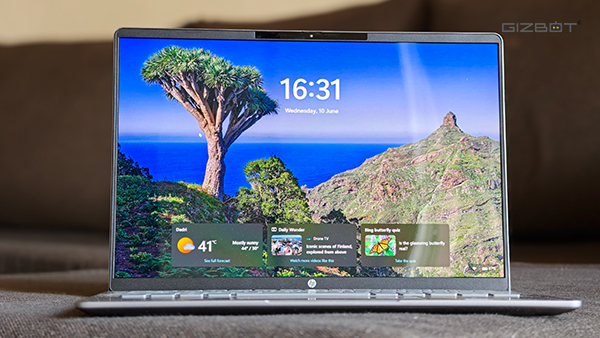
The OmniBook 5 carries a 14-inch 2K OLED panel, and it's comfortably the highlight of the laptop. It's a gorgeous display that's been tuned well, with the kind of colour richness OLED is known for. I spent most of my time with it writing video scripts and, a few days, watching episodes of The Four Seasons on Netflix, and it handled the colors beautifully.
The room I work in gets a fair bit of daylight from the window, which makes it a useful spot to test how a panel holds up against ambient brightness. The OmniBook 5 tops out at around 300 nits, which isn't a lot on paper, but in practice, I was able to work through the day without any real struggle, and text stayed legible even with light coming in. The OLED contrast does a lot of the heavy lifting here to keep everything readable.
It isn't all good news, though. The panel runs at just 60Hz, and at this price, that's disappointing. You feel it the moment you start scrolling through the OS or a webpage, a slight jarring stutter that's hard to ignore once you've grown used to a higher refresh rate, and these days most of us have. It's the one aspect of the display that consistently pulled me out of the experience. It's also not a touch panel, which wasn't a major dealbreaker for me, but it's worth knowing going in, especially if you're used to reaching out and tapping the screen.
HP OmniBook 5 Review: CPU Performance
The HP OmniBook 5 runs the Intel Core Ultra 7 355, an 8-core chip clocked at 3.31 GHz, paired with 16GB of LPDDR5X RAM and a 1TB NVMe SSD. It's a mainstream configuration, and through my time with the laptop, it behaved the way a sensible daily driver should. Writing video scripts across a wall of browser tabs, juggling research and reference material with media playing in the background, the OmniBook 5 kept pace without any stutter or hesitation. For the everyday work the student-and-office crowd will throw at it, nothing here trips it up.
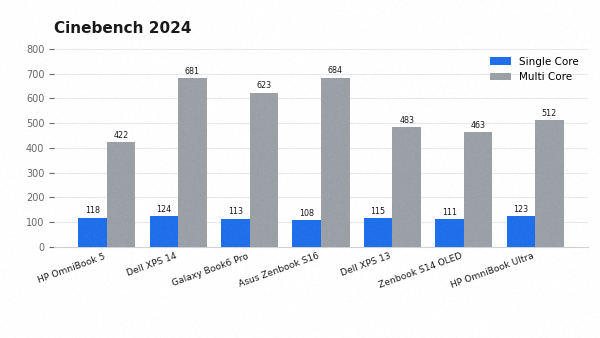
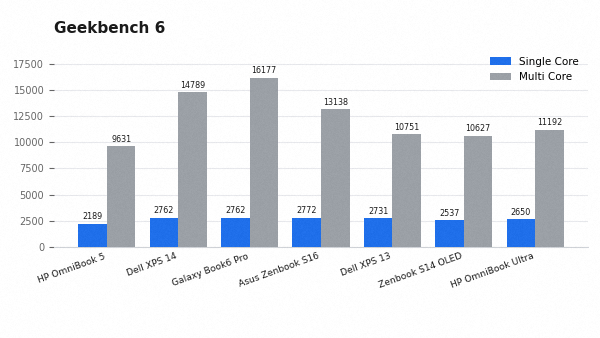
It's worth setting expectations before the numbers, though. It's worth setting expectations before the numbers, though. The Core Ultra 7 355 is a capable Panther Lake chip, but it sits a tier below the higher-end Core Ultra X7 358H found in pricier machines like the Dell XPS 14 or the Galaxy Book 6 Pro, which are included in the graphs below. That difference shows up in the multi-core results below, where the OmniBook 5 trails the top-end configurations. It's the honest framing for this laptop: it's built to handle productivity comfortably rather than to chew through heavy creative workloads.
Starting with Cinebench R23, the OmniBook 5 returned 1946 in single-core and 8006 in multi-core, with an MP ratio of 4.11x. These are solid figures for a chip of this class, and they line up with the smooth everyday experience I had.
In the newer and far more demanding Cinebench 2024, it managed 118 in single-core and 422 in multi-core. Before reading too much into the comparison table, a caveat is worth keeping in mind: most of the laptops listed here are considerably costlier than the OmniBook 5 and run more powerful chips, so this isn't a fair head-to-head.
The OmniBook 5 is also the first laptop we've tested with the Core Ultra 7 355, which means we don't yet have directly comparable machines in our database. Treat these numbers as context rather than a like-for-like contest. With that said, the single-core result is genuinely strong, landing right alongside the Dell XPS 14 and ahead of several pricier machines, which shows Intel's per-core performance holds up well here. The multi-core figure is where the step down in chip tier shows, trailing the higher-end parts by a wide margin.
Geekbench 6 told a similar story, with 2189 in single-core and 9631 in multi-core. The single-core number sits a step behind the leaders here, and the multi-core result again reflects the gap between this chip and the higher-end parts it's up against.
I also ran 3DMark's CPU Profile to see how the chip scales across thread counts, and it topped out at 6023 on max threads, with 5806 at eight threads and 1084 on a single thread. The picture across every test is consistent. This is a capable everyday performer that handles productivity without complaint, as long as you go in understanding it's a productivity machine meant for work and college.
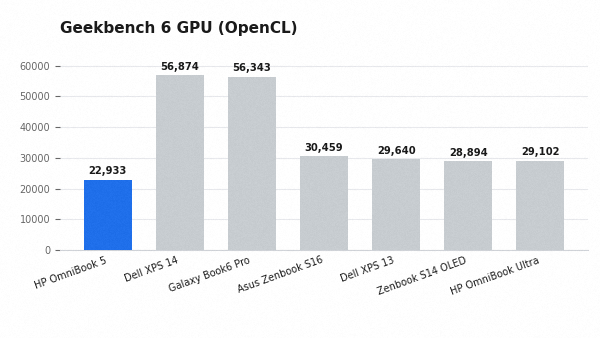
On the graphics side, the integrated Intel GPU posted an OpenCL score of 22933 in Geekbench 6. This is comfortably behind the Arc-equipped Panther Lake machines, which is unsurprising, but it's perfectly adequate for the display output, light photo work, and casual visual tasks this laptop is actually meant for.
HP OmniBook 5 Review: Keyboard and Trackpad
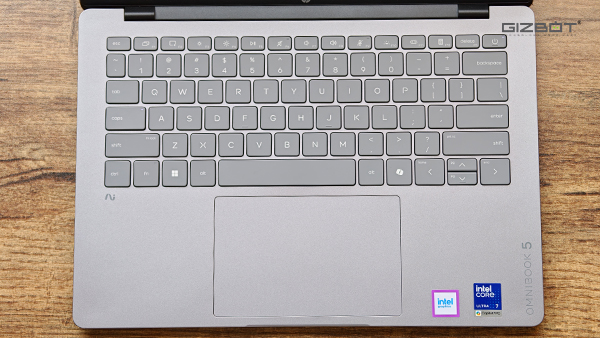
The keyboard is well spaced out despite the smaller chassis, which means there's less room for the mistypes that cramped layouts tend to invite, and I settled into a comfortable rhythm with it quickly. Key travel is decent too, with enough feedback to make longer typing sessions, like the video scripts I wrote on it, feel natural rather than shallow. The keys are backlit as well, so working late into the night in a dim room is never an issue.
The one omission that stings is the lack of a fingerprint sensor, which feels like a genuine miss at this price. You do get face unlock through Windows Hello, so logging in is still quick and hands-free, but a fingerprint reader is the kind of convenience I'd have expected here, and not having the option is a little frustrating.
The trackpad, on the other hand, is large and gives you plenty of room to work with. Gestures and everyday navigation were never a problem, and through my daily use, it tracked accurately without any complaints.
HP OmniBook 5 Review: Battery Life
The OmniBook 5 packs a 59Whr battery, and in my use, it comfortably saw me through an entire workday spent almost entirely in Google Chrome with plenty of tabs open.
At this price, it stacks up reasonably too. The standard Samsung Galaxy Book6, which starts around the same ₹1.2 lakh mark, carries a comparable 61.2Whr battery, so the OmniBook 5 isn't giving up much against its closest rival. On charging, HP bundles a 65W USB Type-C charger in the box. Better still, you aren't tied to it, since any PD charger of the right wattage will top it up just as well.
HP OmniBook 5 Review: Verdict
The HP OmniBook 5 isn't without its misses. The 60Hz panel is the one that stings most at this price, the materials don't feel as premium as the asking figure suggests, and the missing fingerprint sensor is a small but real omission. None of these are dealbreakers on their own, but together they remind you where HP has cut corners.
What matters is that the OmniBook 5 gets the important things right. The OLED display is genuinely lovely, the port selection means you can leave the dongle bag at home, the build held up to far more abuse than its flex suggested, and battery life comfortably saw me through a full workday. For the student or office goer who wants a dependable machine that shows up and does the work, it holds its own well and makes a quiet, sensible case for itself.
If you're open to alternatives, the standard Samsung Galaxy Book6 is the obvious one to weigh at a similar price, offering comparable battery and a polished package. And there's the Asus Zenbook 14 OLED, which comes with a different processor, but both have their own set of compromises that you'll have to consider. That said, if your needs are grounded and your budget is firm, the OmniBook 5 is an easy laptop to live with and recommend.
| Attributes | Notes | Rating |
|---|---|---|
| Design and Build | 3/5 | |
| Display | 4.8/5 | |
| CPU Performance | 4/5 | |
| Keyboard and Trackpad | 4/5 | |
| Battery Life | 3.8/5 |
-
 1,29,999
 -
 22,999
 -
 64,999
 -
 99,999
 -
 29,999
 -
 39,999
 -
-
 63,999
 -
 1,56,900
 -
 96,949

-
 1,39,900
 -
 1,29,900
 -
 79,900
 -
 65,900
 -
 12,999
 -
96,949
-
 16,499
 -
 38,999
 -
 30,700
 -
 49,999
-
 19,999
 -
 17,970
 -
 21,999
 -
 13,474
 -
 18,999
 -
 22,999
 -
 19,999
 -
 17,999
 -
 26,999
 -
 5,999
5,999
-1763362932432.svg)

 Continue with Google

