


 Click it and Unblock the Notifications
Samsung Galaxy Book3 Pro 360 First Impressions: A Big Smorgasbord of Samsung Goodness

Samsung is a household name for smartphones, but the South Korean giant also dabbles with laptops. In its Unpacked 2023 event, it showcased its Galaxy Book3 lineup of thin and light powerhouses: the standard Galaxy Book3 Pro, the 2-in-1 convertible Galaxy Book3 Pro 360, and the flagship Galaxy Book3 Ultra. We got the middle kid of the pack, and with its sleek and lightweight profile, a versatile 360° hinge, and a stylus we actually used quite a lot, the Samsung Galaxy Book3 Pro 360 has a lot going for it.
Samsung Galaxy Book3 Pro 360: What's in the box?
Our review unit arrived in a sleek white box, complete with the laptop, a 65W charger, an S Pen, and some documentation.
The laptop is lightweight and has a sturdy aluminum chassis, making it ideal for travel. Its Graphite color gives it a stealthy appearance, but it is a fingerprint magnet and must be cleaned frequently.
Despite its thin profile, the laptop has a plethora of ports, including a USB-A port, HDMI 1.4, 2x Thunderbolt 4, a micro-SD card slot, and a headphone jack.
Wireless connectivity options include the Wi-Fi 6E and Bluetooth 5.1 standards.
The keyboard has a dedicated NumPad, which is useful for number crunching, but I wish the arrow keys were bigger.
The trackpad is 39% larger than its predecessor, making navigation across Windows 11 quick and easy.
Overall, the Samsung Galaxy Book3 Pro 360 is well-built and suitable for those who need portability without sacrificing connectivity options.
Samsung Galaxy Book3 Pro 360: Price and Specifications
Our review unit came with a 13th Generation Intel EVO Core i7 1360P processor, Intel Iris Xe graphics, and 16GB of RAM.The EVO branding serves as a seal of approval from Intel's tests on the device's battery life, ports and connectivity, charging, and portability. There is also a lower-end SKU with a 13th Gen Intel EVO Core i5 1340P processor.
The device is also available in two storage capacities: 512GB and 1TB; we received the latter.

The hardware is completed by AKG-tuned quad speakers with Dolby Atmos support, a 1080p webcam, a fingerprint reader, and a 76Wh battery.
The device starts at Rs. 1,55,990 and goes all the way up to Rs. 1,79,990-the price of our variant according to Samsung's website.
The Galaxy Book3 Pro 360 Sports a Tall and Gorgeous Display
The Galaxy Book3 Pro 360's 16-inch, 120Hz, Dynamic AMOLED 2X display has a resolution of 2880 x 1880 pixels, a peak brightness of 500 nits, and a 16:10 aspect ratio.
The AMOLED panel and HDR support produce inky blacks, crisp shadows, vivid details, bold colors, and razor-sharp resolution, making 8K YouTube clips a joy to watch.

With a fluidity of 120Hz, the display is fast and smooth, making multitasking a breeze. Using the S Pen on the display is also a pleasure, as I'll explain later.
The increased vertical screen space provided by the 16:10 aspect ratio was especially helpful to me in my line of work, which frequently involves working with documents and spreadsheets.
Overall, if you plan on watching a lot of movies and shows on this device, you will have a fantastic time.
Samsung Galaxy Book3 Pro 360's Hinge and S Pen: The USP of This Machine
Flipping the screen back completely transforms the Galaxy Book3 Pro 360 from a laptop into a tablet, making it a true 2-in-1 device. If you like to watch videos while relaxing on the couch, you can set up the laptop in a tent mode.

Despite having a 16-inch screen, the device's weight and ergonomics make it comfortable to use in tablet mode. Whether in 180°, 360°, or tent mode, the device's hinge remains sturdy.

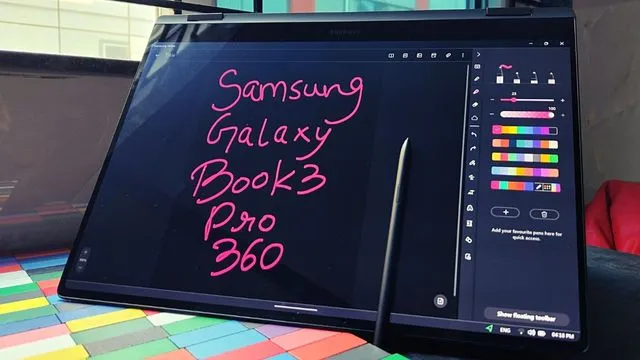
The Galaxy Book3 Pro 360's S Pen is its crowning glory, and I found myself reaching for it often. Whether you're on the run for work or play, the S Pen makes it simple to doodle, take notes, or just navigate the software.
The S Pen shines when the device is in tablet mode, thanks to the smoothness with which one can write or draw on the 120Hz screen. The S Pen's Air Command feature is especially helpful since it provides quick access to many useful applications with a single click.

A plethora of helpful apps, such as Quick Share, Second Screen, Multi Control, and many more, have also been included by Samsung. Multi Control lets you operate your Galaxy tablet or phone using the keyboard and touchpad on your Galaxy Book, while Second Screen lets you connect your Galaxy tablet as a secondary display by duplicating or extending the display of your Galaxy Book.
What Do We Think of the Samsung Galaxy Book3 Pro 360?
While we have yet to test the performance and battery life of the Samsung Galaxy Book3 Pro 360, our initial impressions are very positive. We give the laptop full marks for its lightweight profile, versatile hinge design, 2-in-1 form factor capability, large and beautiful display, and utilitarian S Pen.

Keep an eye out for our full review of the Samsung Galaxy Book3 Pro 360, which will be published soon.
-
 54,999
 -
 99,999
 -
 1,44,900
 -
 89,998
 -
 46,500
 -
 57,998
 -
 53,989
 -
 1,59,999
 -
 1,29,999
 -
 99,999
-
 70,499
 -
 1,56,900
 -
 1,30,990
 -
 17,084
 -
 16,999
 -
 30,999
 -
 9,999
9,999 -
 79,900
 -
 8,999
8,999 -
 79,999
-
 20,999
 -
 37,999
 -
 25,999
 -
 31,999
 -
 24,999
 -
 10,999
 -
 15,999
 -
 45,999
 -
 19,499
 -
 1,61,999
-1763362932432.svg)

 Continue with Google

