


 Click it and Unblock the Notifications
WWDC 2023: Apple announces iOS 17 with Journal App, StandBy Mode, new Features, Improvements

Apple has officially announced iOS 17 at WWDC 2023. The developer beta of iOS 17 will be available to Apple Developer Program members from today and a public beta will be available next month. The latest version of Apple's operating system for the iPhone arrives with several new features and improvements.
iOS 17 brings upgrades across the board, improving the communications experience across Phone, FaceTime, and Messages. It also makes sharing easier with AirDrop and introduces a new app called Journal. Now, let's look at the latest iOS 17 features and upgrades.
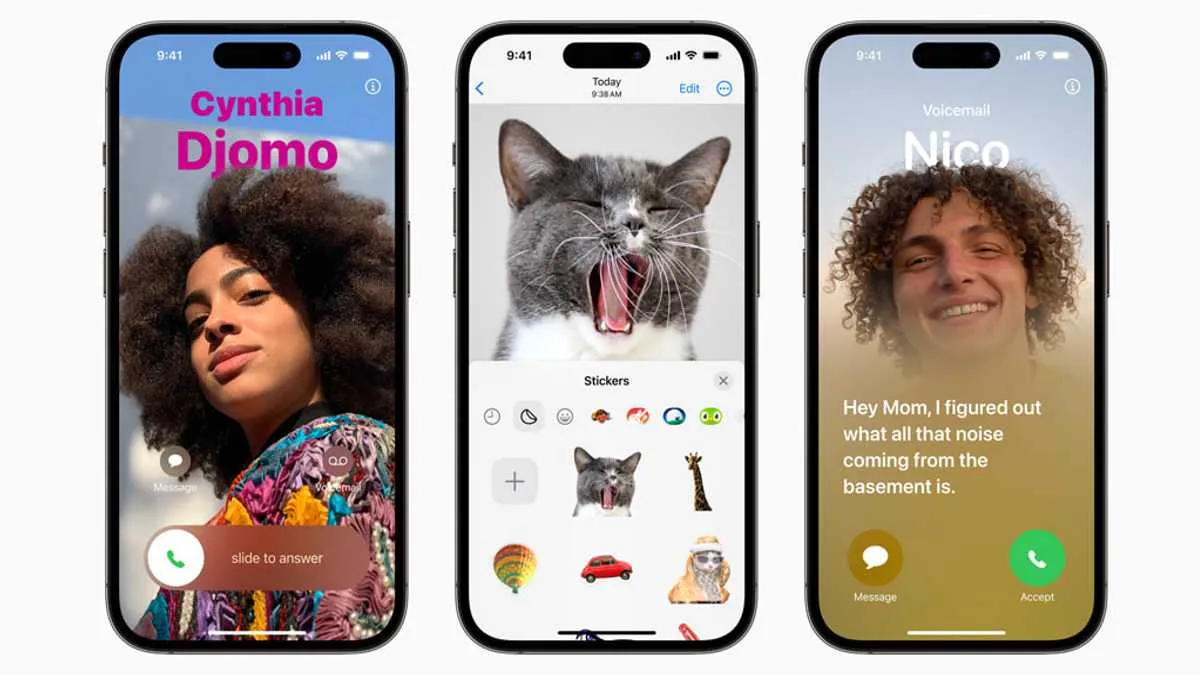
iOS 17 Improvements, New App
The new Journal app is all about journaling, allowing users to track and record their activities and thoughts throughout the day. The app leverages data from the user's iPhone to make suggestions about what they might like to journal, including photos, people, places, and workouts.
Sharing files or sending photos is going to be easier than ever on iOS 17. AirDrop also gets a new feature titled 'NameDrop', which allows users to easily share contact cards by bringing their iPhones or iPhone and Apple Watch together. Users can similarly use SharePlay to listen to music, watch a movie, or play a game while in proximity between iPhone devices.

Autocorrect is getting a major upgrade with on-device machine learning for word prediction. It is also getting a refreshed design with sentence-level autocorrections to fix even more types of grammatical mistakes. Dictation is also getting more accurate by leveraging a new speech recognition model.
iOS 17 Updates - Messages
iOS 17 introduces new Messages features to enhance ways users communicate. The iMessages app now gives Messages a sleeker look, while the Search get more powerful and precise. Additionally, a new catch-up arrow shows where users have last left off in a conversation. Audio messages are now transcribed automatically.
If users share location information, it will be updated in real-time within in the conversation. There's a new Check In feature that will notify family members or friends when a user reaches a destination safely. Any information shared with this Check In feature will be end-to-end encrypted.
iOS 17 Standby Mode
The iPhone can be used as a smart display with the date and time using the StandBy mode. The mode gives users a full-screen experience with the aim to allow users to view information from a distance when the iPhone is on its side and charging.

StandBy Mode can be personalized to display a range of beautiful clock styles, favourite photos, or widgets. The mode also supports Live Activities, Siri, incoming calls, and larger notifications. Standby Mode can be easily accessed by tapping on the iPhone screen. However, with the iPhone 14 Pro's Always-on display, Standby Mode will always be active.
New iOS 17 Features
Several new features are coming to existing iOS apps, including Safari, which now adds greater protection for private browsing. The Health App now offers new mental health features, while Screen Distance in Screen Time will leverage the TrueDepth camera to provide reminders to distance your phone from your face.
Maps now adds offline maps, which will allow users to download specific areas. It also makes it easy to discover thousands of trails in parks across the US and supports electric vehicle drivers with real-time charging availability information. Apple Music introduces Collaborative Playlists that make listening to music with friends easier.
AirPods get powerful new features, including Adaptive Audio, Personalized Volume, and Conversation Awareness. Siri can now be activated by simply saying "Siri." The Home app will let users view up to 30 days of activity. Moreover, Sensitive Content Warning helps adult users avoid seeing unwanted nude images and videos. For all the details on iOS 17 features, head on over to the link.
-
 54,999
 -
 99,999
 -
 1,44,900
 -
 89,998
 -
 46,500
 -
 57,998
 -
 53,989
 -
 1,59,999
 -
 1,29,999
 -
 99,999
-
 70,499
 -
 1,56,900
 -
 1,30,990
 -
 17,084
 -
 16,999
 -
 30,999
 -
 9,999
9,999 -
 79,900
 -
 8,999
8,999 -
 79,999
-
 20,999
 -
 37,999
 -
 25,999
 -
 31,999
 -
 24,999
 -
 10,999
 -
 15,999
 -
 45,999
 -
 19,499
 -
 1,61,999
-1763362932432.svg)

 Continue with Google

