


 Click it and Unblock the Notifications
Xiaomi Pad 8 Nano Texture Review: The Android Tablet India Was Waiting For

Four weeks with the Xiaomi Pad 8 Nano Texture (12GB/256GB), the Focus Pen Pro, and the Focus Keyboard, and I can say this much: Xiaomi has quietly put together the most interesting Android tablet launch in India this year. The matte, anti-glare display that Apple charges nearly Rs 20,000 extra for on the iPad Pro is available here for a Rs 2,000 premium over the standard glossy model. The Snapdragon 8s Gen 4 leaves the Exynos-powered Galaxy Tab S10 FE comfortably behind. And HyperOS 3 on Android 16 finally feels like software that was actually designed for an 11-inch canvas, not stretched up from a phone. The caveats are real, but the value is hard to argue with.

Xiaomi Pad 8 Nano Texture Review: Two-Minute Review
The Xiaomi Pad 8 Nano Texture feels like Xiaomi finally understood what makes a tablet enjoyable beyond raw specs. The matte display is the biggest highlight here. It cuts reflections dramatically, feels great for reading and note-taking, and makes outdoor use far less annoying. Add strong Snapdragon 8s Gen 4 performance, reliable two-day battery life, loud quad speakers, and genuinely useful accessories, and this starts feeling like a proper productivity and entertainment device rather than just a big Android phone.
It's not perfect. The lack of a fingerprint sensor feels strange at this price, there's no 5G option, and Xiaomi still trails Samsung on long-term software support. Some third-party apps also aren't fully optimized for large screens. But for ₹38,999, Xiaomi has built one of the most well-rounded Android tablets in India right now, especially if display quality matters to you.
Xiaomi Pad 8 Nano Texture Review: Design and Build
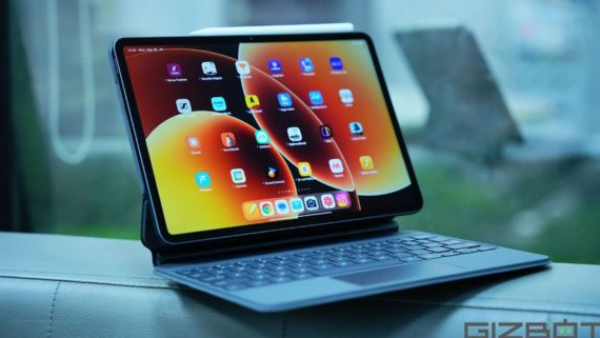
The first thing that surprises you about the Xiaomi Pad 8 is just how thin it is. At 5.8mm and 494g in the Nano Texture trim, it is genuinely slimmer than the iPad Air M3 and trims nearly half a millimetre off the Xiaomi Pad 7. The full-metal aluminium unibody in Graphite Grey - the only colour the Nano Texture model gets in India - feels cold, dense, and quite premium. There is no creak, no flex, and the power key on the top-left edge plus the volume rocker sit exactly where your thumbs land in landscape.
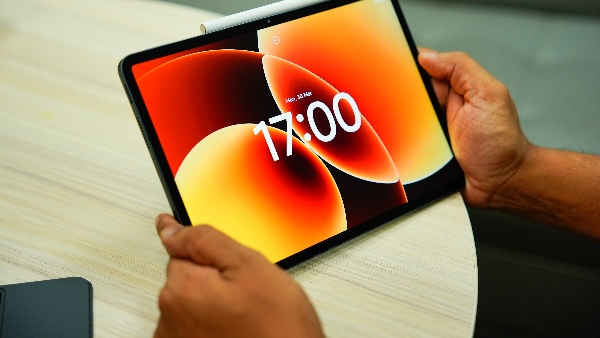
The Nano Texture finish is the star of the whole package. Run a fingertip across it and you feel a fine, almost paper-like tooth, nothing like the skating-rink gloss of a regular tablet. Xiaomi claims a 70 percent reduction in reflectivity, and in practice I could genuinely read a PDF on my balcony at 3PM without the usual contortion. The trade-off is that oils show up as a slight haze rather than sharp fingerprint streaks, and you cannot put a tempered glass protector on it without killing the coating.
What keeps this from a higher score is the absence of a fingerprint sensor, only face unlock, which means banking apps still demand a PIN every single time. That is a strange call when the Redmi Pad 2 Pro at Rs 23,000 has one. The IP52 splash rating also feels conservative for a tablet at this price. But as a physical object, the Pad 8 Nano is one of the most satisfying Android slates I have held.
Xiaomi Pad 8 Nano Texture Review: Display
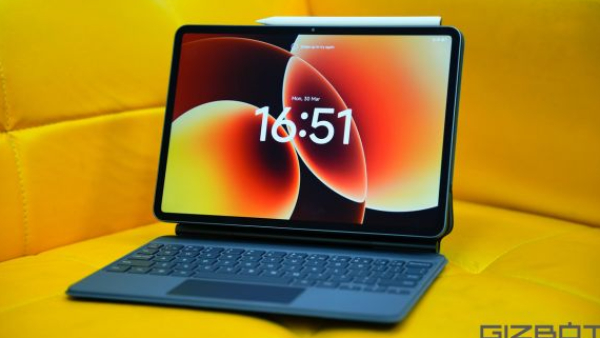
This is the whole reason to pick the Nano Texture variant, and it delivers. The 11.2-inch IPS LCD packs a 3200×2136 CrystalRes panel at 345ppi, runs at a 7-level adaptive 144Hz, hits 800 nits peak brightness, covers 100 percent DCI-P3 in 12-bit colour, and supports Dolby Vision, HDR10, and HDR Vivid. It also carries TÜV Rheinland Low Blue Light and Flicker Free certifications.
What numbers cannot convey is how differently this display behaves in daily life. Watching Dune: Part Two on Netflix with Dolby Vision, the matte surface scatters tubelight reflections into a soft, barely-there glow instead of a sharp mirror image across the screen. The HDR highlights still punch through, skin tones on Panchayat Season 4 look natural, and the 3:2 aspect ratio means top-and-bottom letterboxing is minimal for 16:9 content while reading a long article feels closer to a proper e-reader than a widescreen tablet.
The honest caveat is that this is still an LCD. Dark scenes show the characteristic grey backlight bloom, and if you are coming from an AMOLED phone the absence of true blacks is noticeable in a dark room. But at Rs 38,999, and with this combination of matte coating, 144Hz, Dolby Vision, and 3.2K resolution, no Android tablet in India at or near this price comes close.
Xiaomi Pad 8 Nano Texture Review: Performance
Xiaomi has fitted the Snapdragon 8s Gen 4 (4nm) with 12GB LPDDR5T RAM and 256GB UFS 4.1 storage. It is a meaningful step up from the LPDDR5X and UFS 3.1 on the entry 128GB variant. In benchmarks, I logged Geekbench 6 scores of around 2,078 single-core and 6,396 multi-core, AnTuTu 11 hovering around 2.35 million, and 3DMark Wild Life Extreme stress tests holding about 85 percent stability. That puts it comfortably ahead of the OnePlus Pad 2's Snapdragon 8 Gen 3 in GPU work and in a different league from the Tab S10 FE's Exynos 1580.
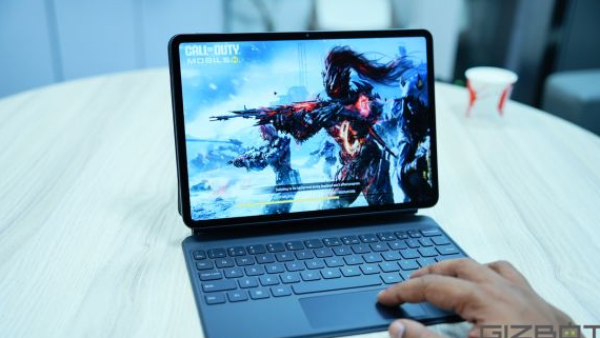
In actual use, BGMI sat pegged at 120fps on Smooth Extreme, Genshin Impact stayed near 60fps at high settings, and Call of Duty Mobile never broke a sweat. Surface temperatures peaked around 41-42 degrees Celsius after an hour of Genshin, which is warm but nowhere near uncomfortable. Multitasking across three floating windows and a split-screen pair produced not a single stutter. HyperOS keeps around a dozen apps in memory without refreshing, and animations stay fluid at 144Hz throughout.
The one performance ceiling worth flagging is gaming at the very top: the Pad 8 Pro's Snapdragon 8 Elite enables HD-plus-120fps in the most demanding titles; the Pad 8 caps at Standard graphics for 120fps. For everything else, this chip is more than enough.
Xiaomi Pad 8 Nano Texture Review: Software and Multitasking
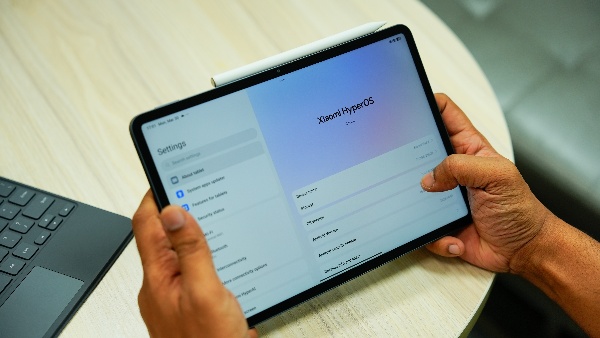
This ships with HyperOS 3 on Android 16, and it is the best tablet software Xiaomi has ever made. Workstation Mode gives you a macOS-style dock, resizable floating windows with over 40 keyboard shortcuts, drag-and-drop between apps, and a new desktop-grade browser rolling out via OTA. HyperConnect talks to iPhones and Macs via Xiaomi's Interconnectivity app. HyperAI bundles Circle to Search, AI Live Subtitles, AI Writing in Notes, and Gemini integration. WPS Office's desktop-grade layouts work beautifully with the keyboard and stylus for everyday Word and Excel work.
The India unit is completely Google Play-native. Bloatware is minimal - GetApps and a couple of Xiaomi utilities, nothing like older MIUI tablets. Xiaomi has not published a formal update policy, but based on the Pad 7's track record, you can reasonably expect three to four Android versions and five to six years of security patches. That falls short of Samsung's seven-year promise on the Tab S10 FE, and it does matter for a device you may keep for four or five years.
The one area where iPadOS still holds a clear lead is third-party app optimisation. Widget scaling in some apps still feels stretched from a phone layout, and the split-screen experience, while good, does not quite match the fluid stage management of an iPad. These are software gaps that can close with updates, though, the hardware is not holding anything back.
Xiaomi Pad 8 Nano Texture Review: Battery Life
Xiaomi has managed to squeeze a 9,200mAh cell into a 5.8mm chassis, and it shows. In my three weeks of use, that translated to two full working days of mixed productivity - Chrome tabs, Google Docs, Slack, YouTube, some sketching in Mi Canvas - without reaching for the charger. I watched the full three-and-a-half-hour IPL broadcast at maximum brightness with the quad speakers at full volume and dropped just 35 percent. Charging from flat to full takes around 90 minutes with the bundled 67W adapter, which is reasonable given the battery size. There is no wireless charging, and no 80W or higher brick to make it faster.
Xiaomi Pad 8 Nano Texture Review: Keyboard / Stylus Experience
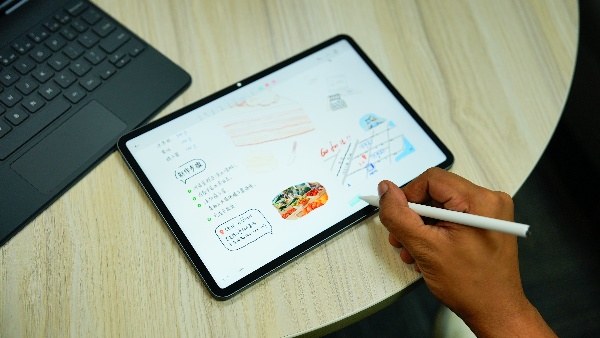
The Xiaomi Focus Pen Pro (Rs 5,999) is the biggest reason to spring for the Nano Texture variant specifically. The 17.5g, buttonless body relies entirely on gestures: a gentle pinch cycles between brush and eraser in Mi Canvas, a double-press opens the colour wheel, a slide along the flat edge adjusts stroke thickness. A subtle haptic buzz acknowledges each input. Xiaomi claims 3ms latency in its own apps - Notes and Mi Canvas - and in those, the ink genuinely tracks the nib like paint on paper. Pressure sensitivity is 16,384 levels, double what the older Focus Pen offered. The magnetic strip on the long edge holds the pen firmly and charges it wirelessly, so you never think about the battery. On the Nano Texture surface, writing feels genuinely paper-like. The friction is real, and strokes land where you want them.
The Focus Pen Pro has two caveats worth mentioning. Tilt sensitivity is unreliable in practice, and the gesture controls only work inside Xiaomi's own apps. In Concepts or Infinite Painter, you get standard pressure-sensitive input and nothing more. Replacement nibs are also not yet listed on Xiaomi India's store.
The Xiaomi Pad 8 Focus Keyboard (Rs 8,999) is the premium folio - there is a simpler Rs 4,999 version without a trackpad or backlight. The premium version snaps magnetically to pogo pins, draws power from the tablet, and holds it on a metal hinge adjustable stepless from 0 to 124 degrees. The 15mm keycaps with 1.3mm travel deliver an almost MacBook-grade typing feel. The glass trackpad with haptic feedback handles three-finger swipes for Home, Recents, and app switching elegantly. Backlighting adapts to ambient light. The keyboard plus tablet comes in at around 1.08kg and 16.3mm folded, MacBook Air territory. I wrote most of this review while moving and found it a genuine work machine for someone like me who doesn't have to do tasks like video editing or software programming. You can still edit short videos on the tablet without any major hurdle.
Xiaomi Pad 8 Nano Texture Review: Audio
The four Dolby Atmos-tuned speakers are among the loudest in this segment, with some independent tests measuring close to 87dB. Dialogue is clean, stereo separation is wide in landscape, and Xiaomi's 200 percent volume boost adds headroom without distortion. There is no 3.5mm headphone jack, so it is USB-C or Bluetooth for wired audio.
Xiaomi Pad 8 Nano Texture Review: Connectivity
Wi-Fi 7 and Bluetooth 5.4 cover wireless. USB-C 3.2 Gen 1 supports DisplayPort alt-mode so you can drive an external monitor. There is an IR blaster for controlling your AC. What is missing is more consequential than what is present. There's no 5G variant at all, and no microSD expansion. Both are surprising given the price and the productivity pitch. If you plan to use this as a laptop replacement on the move, the Wi-Fi-only limitation is a real consideration.
Xiaomi Pad 8 Nano Texture Review: Value for Money
Here is the honest picture. Pad 8 Nano 12/256 plus Focus Pen Pro plus Focus Keyboard runs to roughly Rs 53,000 all-in, or closer to Rs 50,000 with available bank offers. The Samsung Galaxy Tab S10 FE 12/256 with S Pen plus its keyboard cover lands between Rs 62,000 and Rs 70,000. The OnePlus Pad 3 with accessories pushes to Rs 62,000. An iPad A16 with Pencil and keyboard folio crosses Rs 77,000. The iPad Air M3 setup touches nearly Rs 1 lakh. The Xiaomi complete setup is Rs 15,000 to Rs 45,000 cheaper than any comparable ecosystem. Samsung counters with IP68, a bundled S Pen, DeX, and a seven-year software commitment, which are all real advantages. The OnePlus Pad 3 has a bigger display, a faster chip, and a larger battery, but at a meaningfully higher price. For what the Pad 8 delivers in display quality, raw performance, and accessories experience, this is as strong a value case as any Android tablet has made in India.
Xiaomi Pad 8 Nano Texture Review: Verdict
The Xiaomi Pad 8 Nano Texture (12GB/256GB) at Rs 38,999 is the best mid-range Android tablet you can buy in India right now. The nano-texture display alone is worth the Rs 2,000 premium over the glossy model, and the Snapdragon 8s Gen 4 with UFS 4.1 storage ensures nothing feels slow, ever. Add the Focus Pen Pro if you write or sketch, stretch to the Focus Keyboard if you want a laptop replacement, and you have a Rs 50,000 setup that punches well above its weight.
The missing fingerprint sensor is a real everyday irritation. The lack of 5G and microSD (not a deal breaker) limits how far this can travel as a primary device. And HyperOS's update commitment, while decent, still trails the competition. But none of that changes the core story: for the writer, the student, the binge-watcher, and the casual artist, there is no better-value Android tablet in this country at this price. The hardware case for looking elsewhere simply does not exist below Rs 55,000.
| Attributes | Notes | Rating |
|---|---|---|
| Design and Build | Design and Build | 4.5/5 |
| Display | Display | 5/5 |
| Performance | Performance | 4.5/5 |
| Software and Multitasking | 4.5/5 | |
| Battery Life | Battery Life | 4.5/5 |
| Keyboard / Stylus Experience | Keyboard / Stylus Experience | 4.5/5 |
| Audio | Audio | 4.5/5 |
| Connectivity | Connectivity | 4/5 |
| Value for Money | Value for Money | 5/5 |
WHO SHOULD BUY IT
- Students and working professionals who want a capable laptop alternative under Rs 55,000 (with accessories)
- Content creators, writers, and note-takers who will use the stylus daily
- Anyone upgrading from an older Xiaomi or Android tablet and wants a genuine display upgrade
- Binge-watchers who want Dolby Vision on a glare-free panel for under Rs 40,000
WHO SHOULD SKIP IT
- Those who need 5G connectivity on the tablet itself
- Banking-heavy users who cannot work without a fingerprint sensor
- Buyers who want the security of a seven-year software promise (Samsung Tab S10 FE is the better choice here)
- Anyone needing a display larger than 11.2 inches (the OnePlus Pad 3 at 13.2 inches is the alternative)
-
 54,999
 -
 99,999
 -
 1,44,900
 -
 89,998
 -
 46,500
 -
 57,998
 -
 53,989
 -
 1,59,999
 -
 1,29,999
 -
 99,999
-
 70,499
 -
 1,56,900
 -
 1,30,990
 -
 17,084
 -
 16,999
 -
 30,999
 -
 9,999
9,999 -
 79,900
 -
 8,999
8,999 -
 79,999
-
 20,999
 -
 37,999
 -
 25,999
 -
 31,999
 -
 24,999
 -
 10,999
 -
 15,999
 -
 45,999
 -
 19,499
 -
 1,61,999
-1763362932432.svg)

 Continue with Google

