


 Click it and Unblock the Notifications
Gmail is Rolling Out Blue Checkmark to Verify Emails

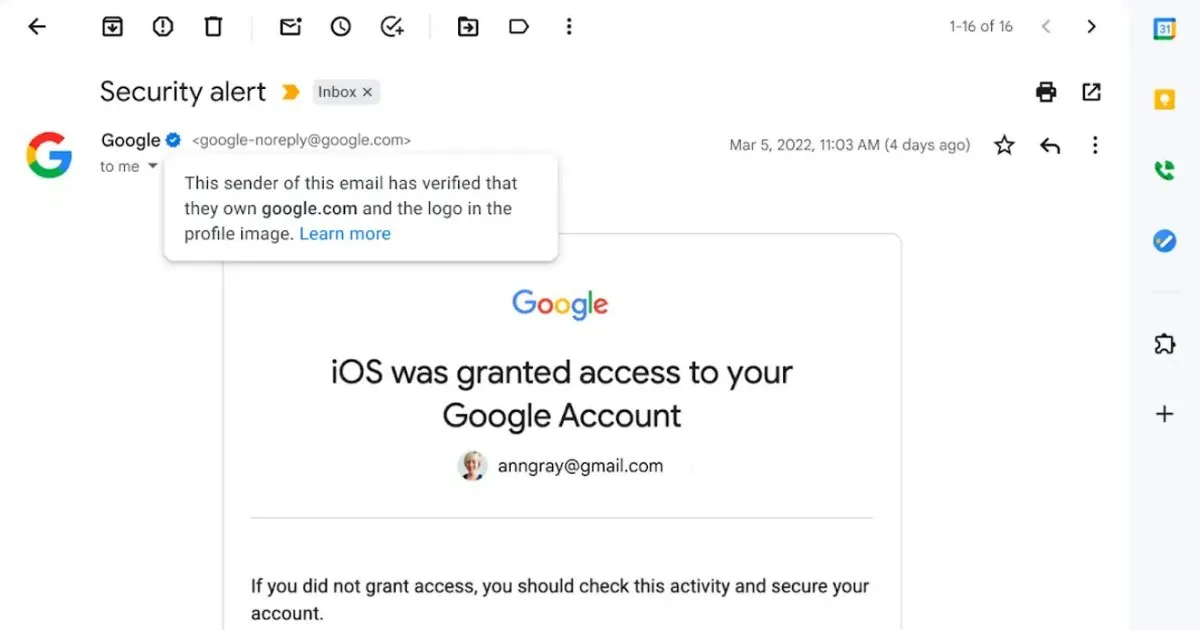
Gmail is adding Blue checkmarks to emails to verify users. It comes after Google added support for verified brand logos in 2021. The verification feature is available to all users with personal Google accounts as well as Google Workspace customers, and legacy G Suite Basic and Business customers.
The Blue Checkmark is based on strong authentication with DMARC (Domain-based Message Authentication, Reporting, and Conformance) and logo verification with a VMC, issued by certification authorities such as Entrust and DigiCert.
The earlier system relied on Brand Indications for Message Identification (BIMI) which relied on brand logos to appear in the profile logo next to the sender's name and address.
How Does the Blue Checkmark Look?
The new checkmark goes a step further with a more explicit icon for senders that have adopted BIMI to help users identify between a legitimate sender and impersonators.
The icon is designed as a blue circle with white checkmark in the middle, and users can hover over it on the web. In Google's case, hovering over the icon says, "The sender of this email has verified that they own Google.com and the logo in the profile image. Learn More."
The blue checkmark in Gmail comes at a time when the feature has been ridiculed at large on Twitter with the antics of its new owner, billionaire Elon Musk. That said, it makes email authentication even stronger, helping users identify and prevent spam and fraud. The checkmark is meant to increase confidence in email sources and to allow brands to offer an immersive experience.
Google is rolling out the Blue Checkmark feature starting today, and will be available to all users of Gmail over the next few days.
-
 54,999
 -
 99,999
 -
 1,44,900
 -
 89,998
 -
 46,500
 -
 57,998
 -
 53,989
 -
 1,59,999
 -
 1,29,999
 -
 99,999
-
 70,499
 -
 1,56,900
 -
 1,30,990
 -
 17,084
 -
 16,999
 -
 30,999
 -
 9,999
9,999 -
 79,900
 -
 8,999
8,999 -
 79,999
-
 20,999
 -
 37,999
 -
 25,999
 -
 31,999
 -
 24,999
 -
 10,999
 -
 15,999
 -
 45,999
 -
 19,499
 -
 1,61,999
-1763362932432.svg)

 Continue with Google

