


 Click it and Unblock the Notifications
Samsung Galaxy Book6 Pro Review: The Windows Laptop I'd Recommend Without Thinking Twice

I have been using the Samsung Galaxy Book 6 Pro for the last month, and I will be very honest here - it has left me impressed. That is not really a shocking statement. The Book 5 Pro from last year was also phenomenal, but Samsung seems to have refined the entire experience, starting with the laptop's design.
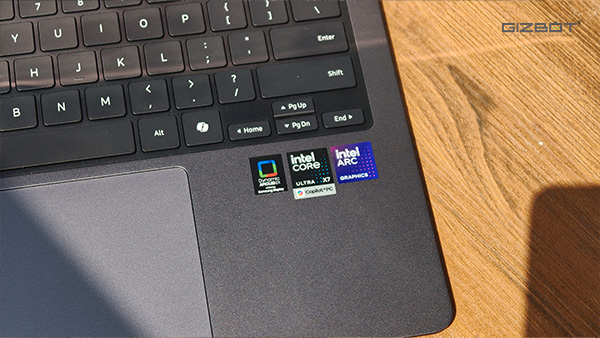
The Book 6 Pro now comes with Intel's latest Panther Lake series of chips, the Core Ultra X7 358H, part of the Core Ultra Series 3 lineup, and while performance is easily handled by it, what I have also been really liking is the battery life. After having used it as my primary Windows machine for work, I can tell you: this is a no-brainer Windows laptop purchase. But only if you have north of 2 lakhs to spend.

Samsung Galaxy Book6 Pro Review: Two-Minute Review
The Galaxy Book 6 Pro is one of the best looking Windows laptops you can buy right now. It is slim, minimal, and genuinely eye-catching without being loud about it. The 14-inch AMOLED display is among the best panels I have used on a laptop. The Book 6 Pro now comes with Intel's latest Panther Lake series of chips - the Core Ultra X7 358H, part of the Core Ultra Series 3 lineup - paired with 32GB of LPDDR5X RAM and a 1TB NVMe SSD. And while performance is easily handled by it, what I have also been really liking is the battery life.
Battery life is where this thing really earns its keep. In real use, I never had to carry the charger to work. And if you have a Samsung Galaxy phone, the ecosystem integration here is the tightest I have seen any Windows laptop pull off.
Samsung Galaxy Book6 Pro Review: Ports and Connectivity
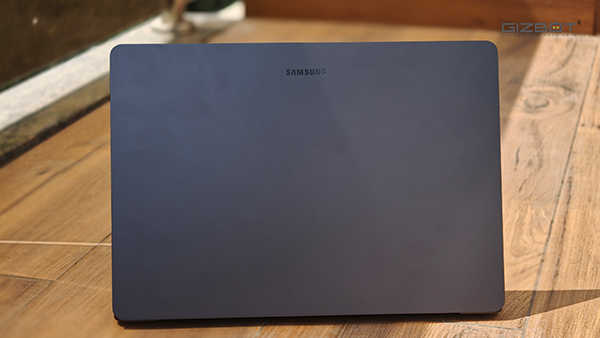
I will just say it directly: the Galaxy Book 6 Pro is one of the best-looking Windows laptops in the market right now. Not the best looking in an aggressive, RGB-everywhere way. Best looking in the way that makes you pick it up from the table without thinking twice. It is slim, sleek, and does not try too hard. The design is just very clean and minimal. And this is something I enjoy a lot.
The build quality backs up the looks, too. It feels premium in the hand, and because it is so thin and light, carrying it around genuinely never feels like a task. Sliding it into a backpack and lugging it around during your commute to work is not taxing at all. It's a compact laptop after all. The 14-inch form factor is the sweet spot for me personally.
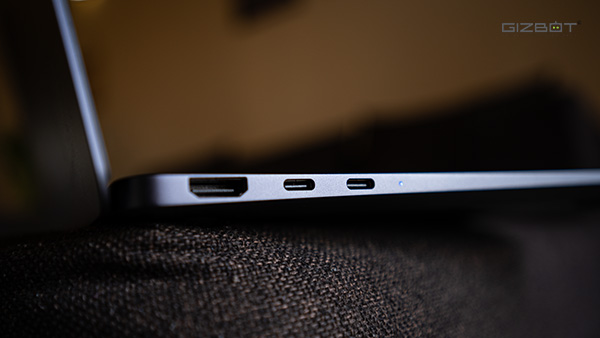
And here is where Samsung pulls ahead of the obvious comparison. Yes, the Galaxy Book 6 Pro is almost as thin as the MacBook Air series. But unlike the MacBook Air, Samsung has not sacrificed your ports to get there.
The MacBook gives you two USB-C ports and sends you on your way. The Galaxy Book 6 Pro offers two USB-C ports, an HDMI output, a USB-A port, and a 3.5mm audio jack. That's pretty much everything you would require for office work.
Samsung Galaxy Book6 Pro Review: Display
Okay, this is my favorite part. The display on the Galaxy Book 6 Pro is probably one of the best I have used on a laptop - and honestly, coming from Samsung, it's not really surprising. It is an AMOLED panel, and the difference is immediately apparent. The colors are rich, punchy, and vibrant. The resolution is very sharp. The viewing angles are excellent. I watched stuff while sitting next to someone at a pretty steep angle, and they could see everything clearly without asking me to tilt the screen.
I have been using the laptop out on my balcony, where the sun is relentless, and I could still read and work without squinting or shielding the screen. So, the brightness levels are also quite good. The 120Hz panel makes the UI feel fluid and snappy throughout. It is also a touchscreen, which I know a lot of people do not use, but I do, and the touch response here is very precise. No complaints. The display here is a 2880x1800 pixels, so text and movies appear sharp.
I binge-watched Daredevil on Hotstar on this display, and honestly, that is a great test because the show has a lot of dark scenes. The AMOLED panel handled those deep blacks beautifully, the kind of blacks that actually look black and not dark grey. Switching things to Big Bang Theory was also fun with all the vibrant colors coming out punchy.
Samsung Settings and Colour Modes
One thing that impressed me a lot here is what Samsung has done with its Settings app. Instead of relying on Windows' built-in display options - which honestly leave a lot to be desired - Samsung has built its own layer on top of Windows, and somehow, nothing breaks. It actually works smoothly. From here, you can switch between color gamuts depending on what you are doing: Adobe RGB for color grading or photo editing, sRGB for general use, and DCI-P3 for media. The flexibility is genuinely appreciated, and it is implemented cleanly.
There is also Vision Booster, and something called Hide Window - mapped to Windows + F11. It is Samsung's take on a privacy display feature, giving you two options: make the current window transparent or make it dim. It also allows you to tweak the level using a slider. It is not a true privacy display panel, of course, but it is an interesting implementation of the idea, and it works for what it is.
Samsung Galaxy Book6 Pro Review: CPU Performance
The variant I have been using packs the Intel Core Ultra X7 358H. This is Intel's brand-new Panther Lake chip — part of the Core Ultra Series 3 lineup — paired with 32GB of LPDDR5X RAM running at 9600 MT/s and a 1TB NVMe SSD. In everyday use, it is exactly as fast as those specs suggest. I regularly have multiple Google Sheets open alongside 10-12 Chrome tabs, some of which have 4K videos playing on YouTube, and this laptop does not flinch. This is pretty much expected from a laptop of this caliber and price.
I also put it through some video editing work. A 4K YouTube Shorts timeline in Premiere Pro was handled smoothly. The timeline scrubbing was responsive, and the export worked without the laptop turning into a jet engine. MOGRT files can occasionally cause trouble, and I did experience one Premiere crash, but that honestly felt more like an Adobe problem than a laptop problem. As long as you are not stacking a timeline with heavy templates, the Galaxy Book6 Pro handles on-the-go edits well.
Geekbench 6 | ||
| Laptop | Single Core | Multi Core |
| Galaxy Book6 Pro | 2762 | 16177 |
| Asus Zenbook S16 | 2772 | 13138 |
| Dell Pro 14 | 2002 | 8263 |
| Dell XPS 13 | 2731 | 10751 |
| Asus Zenbook S14 OLED | 2537 | 10627 |
| HP Omnibook Ultra | 2650 | 11192 |
When exporting these 4K projects, the bottom of the laptop does get warm, and some of that heat creeps into the palm rest and keyboard area, which can get a little uncomfortable. The laptops start spinning at this point, but they never reach an uncomfortably loud level. And a bit of context matters here: I have been testing this in peak Delhi summer, with temperatures outside hitting 40 degrees Celsius. All things considered, the thermals are very reasonable for a laptop of this form factor.
Cinebench 2024 | ||
| Laptop | Single Core | Multi Core |
| Galaxy Book6 Pro | 113 | 623 |
| Asus Zenbook S16 | 108 | 684 |
| Dell Pro 14 | 80 | 529 |
| Dell XPS 13 | 115 | 483 |
| Asus Zenbook S14 OLED | 111 | 463 |
| HP Omnibook Ultra | 123 | 512 |
In Cinebench 2024, the Galaxy Book 6 Pro scored 113 on Single Core and 623 on Multi Core. The single core score puts it in the middle of the pack — the Dell XPS 13 and HP Omnibook Ultra edge it out slightly — but the multi core score is where the Panther Lake chip really shows up, beating out most of the competition here. The Asus Zenbook S16 with the Ryzen AI 9 465 does pip it on multi-core with 684, but the Asus is a much bigger chassis at 16 inches, so it has more room to let the heat out.
Geekbench 6 GPU | |
| Laptop | Score |
| Galaxy Book6 Pro | 56343 |
| Asus Zenbook S16 | 30459 |
| Dell Pro 14 | 19192 |
| Dell XPS 13 | 29640 |
| Asus Zenbook S14 OLED | 28894 |
| HP Omnibook Ultra | 29102 |
The Geekbench 6 GPU score is where the Galaxy Book 6 Pro really flexes. The B390 iGPU scored 56,343. This is nearly double what every other laptop in this comparison managed. The Asus Zenbook S16 came in second at 30,459, and everything else trailed further behind.
Samsung Galaxy Book6 Pro Review: Keyboard and Trackpad
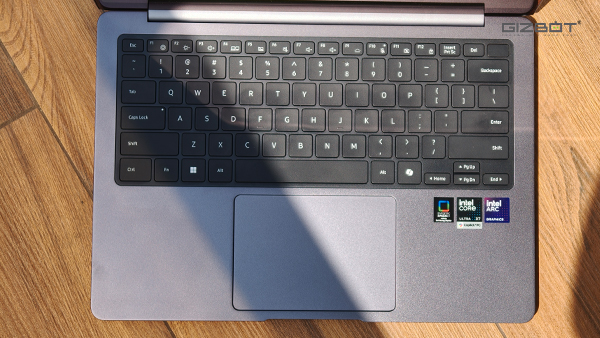
I will keep this simple: I wrote this entire review on the Galaxy Book 6 Pro. If the keyboard was not good enough, you would know, because I would have said so at some point over the past several thousand words. The keys are well-spaced, have a nice finish that does not attract fingerprints easily, and the travel is decent. Long typing sessions genuinely do not produce any fatigue, which is exactly what you want from a laptop you are planning to work on for hours.
The function row includes media controls, display brightness, keyboard brightness, and all the shortcuts you reach for regularly. The keyboard is backlit, which is pretty much mandatory. The light spread is even, neither too dim nor painfully bright. The fingerprint sensor is embedded in the power button, and it works flawlessly. The power button is also shaped differently so that you can tell it apart.
The trackpad is buttery smooth. It is a decent size, not enormous, but spacious enough to use gestures comfortably. The entire surface is clickable, which I appreciate because it means you are not stuck tapping only the bottom half.
Samsung Galaxy Book6 Pro Review: Battery Life
The Galaxy Book 6 Pro packs a 78Whr battery. In the PCMark Video test the Book6 Pro lasted for 22 hours and 58 minutes. That is nearly a full day of video playback at 50% brightness, and it is one of the more impressive battery numbers I have seen on a Windows laptop.
And it tracks with real use. I never once felt the need to carry the charger around during a normal workday. The Core Ultra X7 358H is clearly doing strong work on the efficiency front, and the combination of the AMOLED panel and the Panther Lake architecture seems to be working very well together. The bundled charger is a 65W USB-C unit, which means you don't have to carry extra power cables.
Samsung Galaxy Book6 Pro Review: Software / Extras
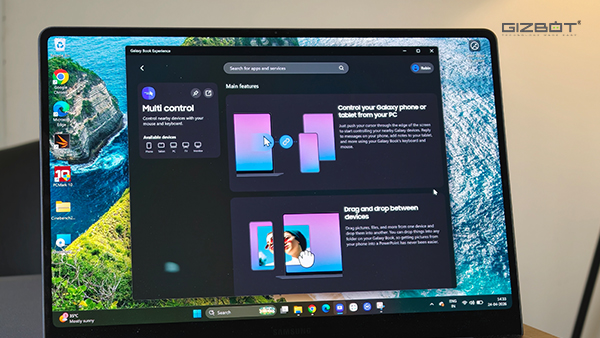
Here is something I think Samsung deserves real credit for. They have taken Windows - which is a mess in many places - and built their Galaxy integration on top of it in a way that actually works smoothly. Galaxy AI is baked in. AI cutouts are handy when you are doing any kind of quick image editing, text translation works by just selecting text, and Storage Share means your Galaxy phone and tablet storage is accessible directly from the laptop/ What this essentially means is that you don't really have to upload images or videos to Google Drive. A lot of my articles need photos, and I have just been clicking them on my S26 Plus and accessing them directly on the Book 6 Pro.
Nearby Devices and Quick Share work with pretty much any Android phone, so this is not just locked to Samsung users. Multi Control and Second Screen round out the ecosystem features. Second Screen is particularly useful if you are used to a dual-monitor setup, as it turns a Galaxy Tab into a secondary display. You will need a Galaxy Tab for that one, but if you have one, it is a nice addition.
Samsung Galaxy Book6 Pro Review: Value for Money
The Samsung Galaxy Book 6 Pro is one of those laptops where after a month of using it, you genuinely do not want to give it back. And I say this as someone who has used a lot of Windows laptops. Most of them have something that bothers you eventually - the battery gives out quick, the display looks washed out in daylight, the fans kick in the moment you open anything heavier than a browser tab. The Galaxy Book 6 Pro does not really have that one thing that bothers you. It is just a very complete package.
The Panther Lake chip is quick and efficient, the AMOLED display is gorgeous, the battery life is genuinely impressive, and if you are in the Samsung ecosystem, the integrations here are the best I have seen on any Windows laptop.
At ₹2,14,990, this is not an impulse buy by any means. But if you are in the market for a premium Windows laptop and you have been going back and forth trying to figure out what to spend your money on, the Galaxy Book 6 Pro makes that decision a lot easier. Especially if you are already own other Samsung devices. If you are looking for alternatives, the Dell XPS 14 just launched with the same chip. That makes this segment quite interesting. I'm currently working on a review for the same. So, stay tuned to Gizbot to read up on that next week.
Samsung Galaxy Book6 Pro Review: Verdict
• You are already in the Samsung ecosystem - the Galaxy phone and tab integrations are genuinely seamless
• You want one of the best displays on a Windows laptop right now
• You need a slim, port-rich laptop that you can carry everywhere without thinking about battery anxiety
• You want a laptop that can handle work and a bit of light video editing
| Attributes | Notes | Rating |
|---|---|---|
| Ports and Connectivity | Multiple port options | 5/5 |
| Display | Excellent AMOLED panel | 4.8/5 |
| CPU Performance | Intel's new Panther Lake performs exceptionally well | 4.5/5 |
| Keyboard and Trackpad | Decent travel and good spacing | 4/5 |
| Battery Life | Good battery life | 4.8/5 |
| Software / Extras | Excellent Samsung ecosystem features | 4.8/5 |
| Value for Money | 4/5 |
-
 54,999
 -
 99,999
 -
 1,44,900
 -
 89,998
 -
 46,500
 -
 57,998
 -
 53,989
 -
 1,59,999
 -
 1,29,999
 -
 99,999
-
 70,499
 -
 1,56,900
 -
 1,30,990
 -
 17,084
 -
 16,999
 -
 30,999
 -
 9,999
9,999 -
 79,900
 -
 8,999
8,999 -
 79,999
-
 20,999
 -
 37,999
 -
 25,999
 -
 31,999
 -
 24,999
 -
 10,999
 -
 15,999
 -
 45,999
 -
 19,499
 -
 1,61,999
-1763362932432.svg)

 Continue with Google

