


 Click it and Unblock the Notifications
Final Cut Pro and Logic Pro Now Available on iPads

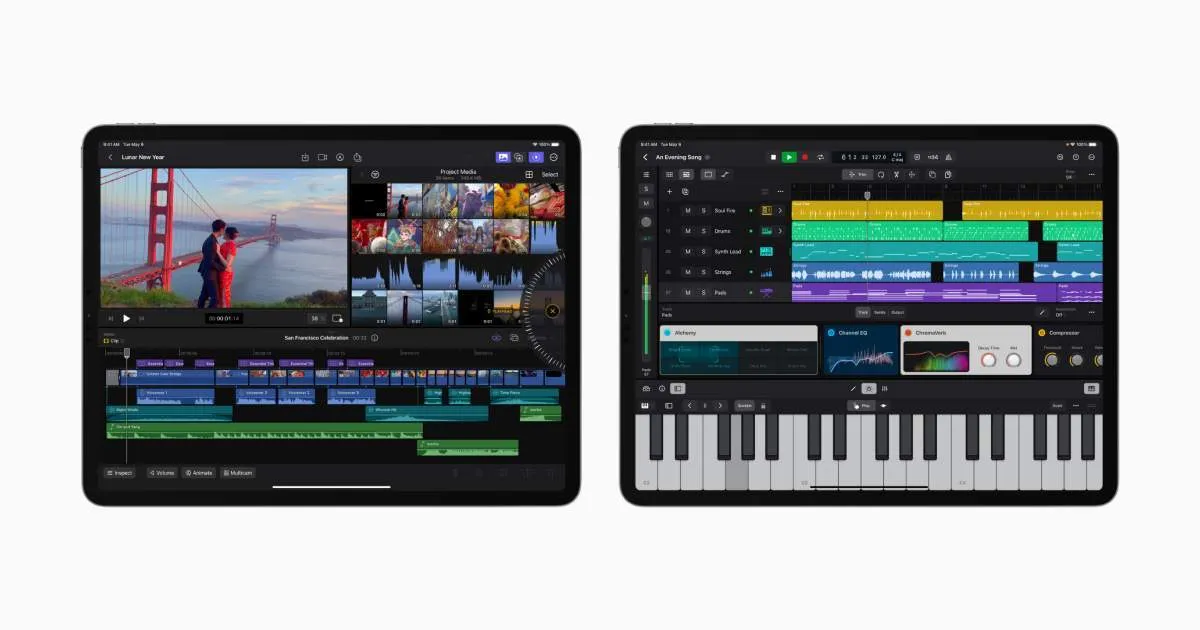
Apple has launched the iPad version of the Final Cut Pro and Logic Pro apps, allowing video and music creators to unleash their creativity on the go on the iPad. The two apps feature redesigned touch interfaces allowing users to get a similar experience as that on the Macs.
The two apps will be available later this month as subscriptions on the App Store.
Final Cut Pro For iPad Launched
Final Cut Pro for the iPad brings a new touch interface, including a new jog wheel that makes the editing process much smoother, allowing users to interact with content in new ways, Apple said. The jog wheel works on the magnetic timeline, with the option to move clips, and allows for fast frame-accurate edits with a tap of a finger.
The app also includes Live Drawing, which allows users to draw and write directly on top of the video content using Apple Pencil. iPads powered by the Apple M2 chip also get Apple Pencil Hover feature that allows users to to quickly skim and preview footage without touch the screen.
If the touch interface is not your preference, the app also works with the Magic Keyword or Smart Keyboard Folio.
Final Cut Pro on iPad allows for editing HDR video, with the Liquid Retina XDR display on the iPad Pro 12.9-inch an apt choice for video editors.
The app also leverages Apple Silicon's machine learning capabilities to speed up editing tasks. For instance, a scene removal mask allows users to quickly remove or replace the background behind the subject without using a green screen. Auto Crop adjusts the footage for vertical, square or other aspect ratios.
Video creators can also choose from a vast library of professional graphics, effects, and audio to enhance their storytelling. These include stunning HDR backgrounds, customisable animated patterns, and professional soundtracks that automatically adjust to the length of a video.
Logic Pro For iPad Launched
Aside from FCP, Apple also announced the Logic Pro app for iPad, allowing music professionals to create straight from the iPad. This too supports multi-touch gestures allowing creators to play software instruments and interact naturally with controls. The app brings plug-in tiles that puts useful controls at the fingertips. The built-in mic can be used to record voice or instruments. This too supports the Apple Pencil and keyboards for better controls.
The app brings a new sound browser with dynamic filtering along with over 100 instruments and effects plug-ins to play around with. Effects like vintage EQs, compressors, and reverbs let users tweak and fine-tune their tracks. With Multi-Touch, creators can play instruments using a variety of play surfaces.
It also includes a full-fledged mixer with channel strips, volume faders, pan controls, and other features allowing music creators to create professional mixes on the iPad entirely. Multi-Touch enables creators to mix intuitively and move multiple faders at once, and the mixer meter bridge lets them quickly navigate an overview of track levels.
Both app support import and export between their respective versions for Mac. Music creators can make a soundtrack in Logic Pro for iPad and export it into Final Cut Pro for iPad - providing incredible flexibility for working across music and video. Logic Pro for iPad also supports the ability to open projects created in GarageBand for iOS.
Pricing and Availability
Final Cut Pro and Logic Pro for iPad will be available from May 23. Both apps will be available for download from the App Store with a subscription fee of Rs 499 per month or Rs 4,999 per year with one-month free trial.
Final Cut Pro works on iPads that runs on the Apple M1 chip, while Logic Pro is available for iPads with A12 Bionic chips and above. Both apps require iPadOS 16.4 to run.
-
 54,999
 -
 99,999
 -
 1,44,900
 -
 89,998
 -
 46,500
 -
 57,998
 -
 53,989
 -
 1,59,999
 -
 1,29,999
 -
 99,999
-
 70,499
 -
 1,56,900
 -
 1,30,990
 -
 17,084
 -
 16,999
 -
 30,999
 -
 9,999
9,999 -
 79,900
 -
 8,999
8,999 -
 79,999
-
 20,999
 -
 37,999
 -
 25,999
 -
 31,999
 -
 24,999
 -
 10,999
 -
 15,999
 -
 45,999
 -
 19,499
 -
 1,61,999
-1763362932432.svg)

 Continue with Google

