


 Click it and Unblock the Notifications
Gizmore Vogue Smartwatch Review: Bang for the Buck?

While certain well-known companies such as Boat, Noise, OnePlus, and Realme have dominated the charts, newer manufacturers are flooding the market with feature-rich smartwatches. With its focus on fashion and design, Gizmore Vogue is the latest entrant.
Its primary audience is the Gen-Z, who want a stylish and functional device on their wrist. We tried the budget-friendly wearable for almost a week to see how it performs in real-world scenarios. Here's what we think.

- Aesthetic Design
- Speaker Quality
- Ample Navigation Buttons

- Inaccurate Health Sensor Monitoring
- Average App Experience
Gizmore VOGUE: Design
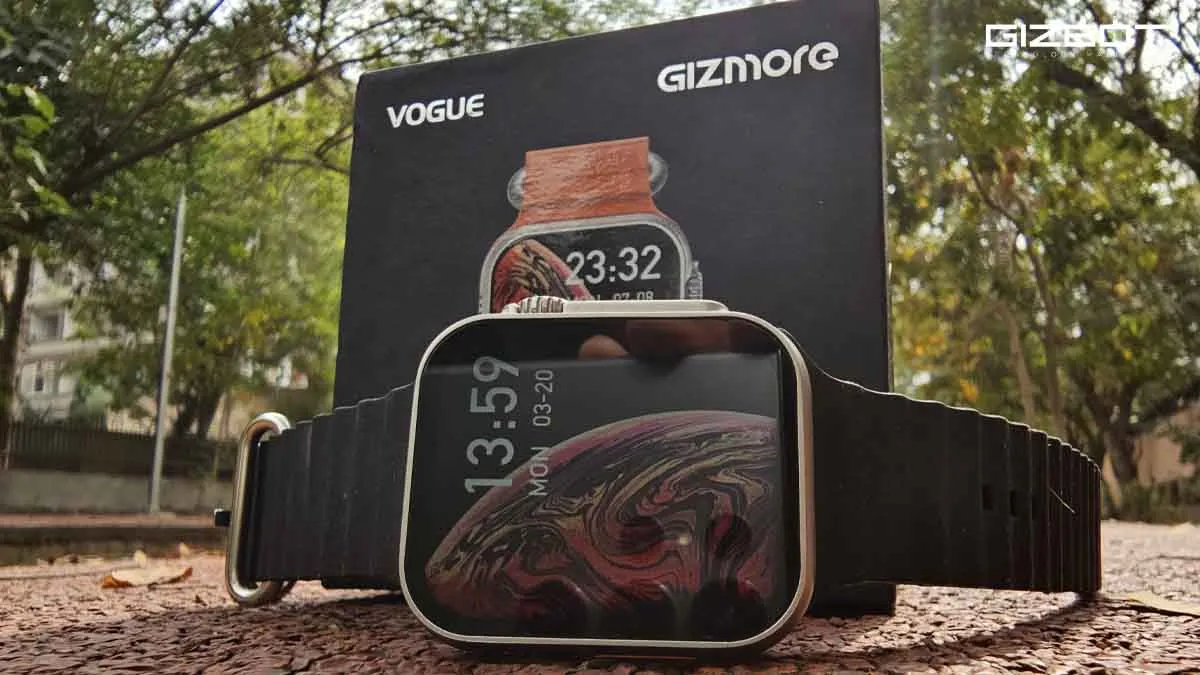
The Gizmore Vogue has a striking resemblance to the Apple Watch Ultra, but unlike the premium Apple wearable, this one comes at an affordable price of just ₹1,999. To my surprise, it also has a colored accent on the button.
For the looks, it's worth every penny. Furthermore, the Vogue has a rotating crown that makes browsing through various applications a treat. It also has two extra buttons, one for switching on/off and another for viewing recent apps, which is a great addition, in my opinion.
Gizmore VOGUE: Display
Credit where credit's due. The gigantic 1.95-inch HD Always on Display (AOD) is sufficiently bright for indoor and outdoor usage. The viewing angles are also reasonably dynamic.

The Gizmore Vogue has a large selection of watch faces, which made it enjoyable to personalize according to my personality and travel itinerary. The bezels are big, but so is the display screen, which compensates for the size of the smartwatch.
Gizmore VOGUE: Build Quality & Comfort
The Gizmore Vogue boasts a premium metal case, which is comfortable and looks good on the wrist. However, the rear housing of the watch (the charging face) is slightly bulged out, because of which I experienced slight discomfort after extended usage.

Since I have a smaller wrist, the watch felt bulky, and I had to remove it while sleeping.
Gizmore VOGUE: How to Connect to Smartphone
- Switch on your watch
- Download VFIT App
- Register using your email ID
- Add your body data
- Give permissions to the app to take calls and access contacts and 3rd party apps
- Tap on the equipment option present on the bar at the bottom
- Tap on "Add Watch"
- It will show GizFit Vogue on the radar if the device is in the vicinity
- Tap on it
- The watch will pair in a few seconds
- If there are new software updates for the watch, they will automatically pop up on the screen, and you need to tap on update
- Lastly, permit the app for notifications, and display on top of other apps
Gizmore VOGUE: Speaker Quality
The highlight of Gizmore Vogue is its loudspeaker quality, the best in class is the least I can say. Whether call reception or listening to your favorite music on the fly, Vogue delivers and outperforms the competition. Listening to music on this wristwatch is a breath of fresh air.
Gizmore VOGUE: Mic & Call Quality
The call reception, as I mentioned earlier, is top-notch. However, I think the mic quality can be improved in future generations. Don't get me wrong: it's good for the price and does the job, but it leaves me wanting a bit more depth on the receiving end.
Gizmore VOGUE: IP67 (Water & Dust Resistant)
Gizmore claims VOGUE to be IP67 rated, which makes it water and dust resistant.
I did not test it personally, but if you'd like to watch a LIVE video test for the same. Do let me know in the comments.
Gizmore VOGUE: Day-To-Day Performance
The wearable smartwatch supports multiple sports modes for a typical workout session. Be it walking, running, hiking, cycling, basketball, swimming, yoga, or a variety of other activities. However, the basic sensor readings of the heart rate monitor were inaccurate by margins.

To my amazement, when I used the wristwatch to monitor the heart rate (as a gimmick) of my iPhone 13 and Samsung Galaxy S23 Ultra, instead of notifying me that the smartwatch was not on my wrist, it managed to provide readings of both smartphones' heart rates.
Gizmore VOGUE: Touch Response & User Interface
The User Interface has been improved by Gizmore when compared to its previous generation smartwatches and, for its price point, it felt snappy. The touch is mostly accurate.

However, I noticed that there's also a touch sensitivity issue, as the Gizmore Vogue doesn't detect the touch at times, which is a bummer.
Gizmore VOGUE: Battery Life
In my usage, the Gizmore Vogue sustained four days on a single charge without the calling feature. It lasted about a day and a half with the Bluetooth calling option active. In terms of charging time, the smartwatch takes about two hours to refill the juice.
Gizmore VOGUE: Verdict
To narrow it down, Gizmore, with its VOGUE smartwatch, has cracked the code to bring premium design at an affordable price range. For the looks, speaker quality, and calling experience, the smartwatch is a Bang for the Buck.

If you're always on the fly and require a good-looking smartwatch to check the time and receive calls, the Gizmore VOGUE is the way to go. With that said, if you're looking for a smartwatch to actively and accurately monitor your health, the VOGUE still has miles to cover.
What do you think about Gizmore Vogue? Let us know in the comments!
-
 54,999
 -
 99,999
 -
 1,44,900
 -
 89,998
 -
 46,500
 -
 57,998
 -
 53,989
 -
 1,59,999
 -
 1,29,999
 -
 99,999
-
 70,499
 -
 1,56,900
 -
 1,30,990
 -
 17,084
 -
 16,999
 -
 30,999
 -
 9,999
9,999 -
 79,900
 -
 8,999
8,999 -
 79,999
-
 20,999
 -
 37,999
 -
 25,999
 -
 31,999
 -
 24,999
 -
 10,999
 -
 15,999
 -
 45,999
 -
 19,499
 -
 1,61,999
-1763362932432.svg)

 Continue with Google

