


 Click it and Unblock the Notifications
Asus ROG Zephyrus Duo 16 (2023) Review: Worth the Price?

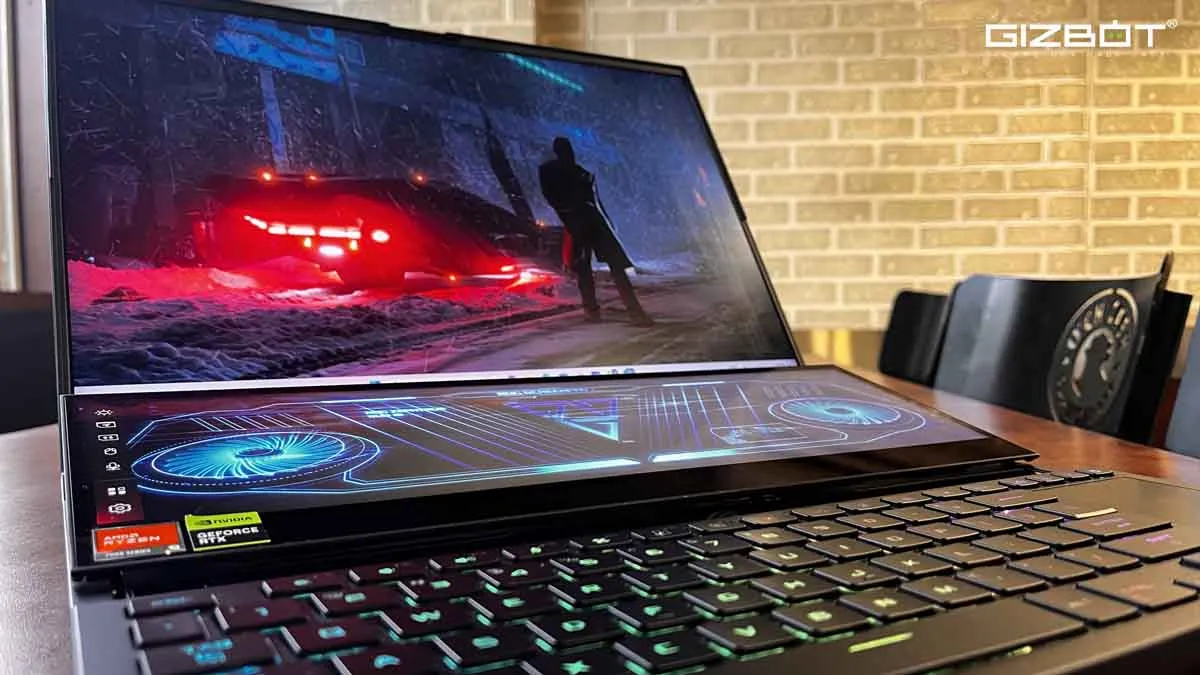
Calling the ROG Zephyrus Duo 16 (2023) a laptop is like calling the Burj Khalifa a skyscraper. Technically, they are both the specified items, but they are so much more. The ROG Zephyrus Duo 16 (2023) is one of the recent additions to Asus's top line of gaming laptops and is loaded with powerful features which can cater to all your needs. I don't just mean intensive gaming, but can also double as a portable content creation workstation.
Packed with flagship features like one of the fastest on paper CPU and GPU i.e. Rysen 9 7945HX and NVIDIA Geforce 4090 respectively, the specks on this machine are off the charts. In this review, I'll tell you whether or not the ROG Zephyrus Duo 16 (2023) is the beast it looks to be.

- Futuristic Design
- Exceptional performance
- Handy secondary display
- Great Airflow due to the secondary display

- Too Bulky
- Not Ergonomic in terms of keyboard and trackpad placement
- Disbalanced ports placement
Specks
- CPU: AMD Ryzen 9 7945HX, 5.4GHz Boost Clock, 16 cores/ 32 Threads
- GPU: NVIDIA® GeForce RTXTM
- Main Panel: 16" 16:10, QHD+ Mini-LED (2560 x 1600) 240Hz,
- Secondary Display: 14" ScreenPadTM Plus 3840 x 1100 (4K) IPS-level
- RAM: 32GB DDR5 4800MHz (16GB *2) Upgradeable up to 64GB, Dual Channel Support
- Storage: 2TB M.2 2280 PCIe® 4. SSD
- I/O Ports:
- 1x 2.5G LAN port
- 1x USB 3.2 Gen 2 Type-C support DisplayPortTM
- 1x USB 3.2 Gen 2 Type-C support DisplayPortTM
- 2x USB 3.2 Gen 2 Type-A
- 1x card reader (microSD)
- 1 x HDMI 2.1
- 1 x 3.5mm combo Audio Jack
- Network: Wi-Fi 6E (802.11ax) (Triple-Band) + BT v5.2
- Camera: 1080P HD IR Camera with Windows Hello Face Recognition Login
- Audio: 6 Speakers
- (2x 2W Dual-Force woofers with Smart Amp Technology, 2 x 2W Tweeter)
- Battery: 90Whr, 4-cell
- Dimensions: X: 355mm Y: 266mm x H: 20.5 ~ 29.7mm
- Weight: 2.67Kg
Built and Design
When the flap is closed, the ROG Zephyrus Duo 16 (2023) looks like an ordinary and not an overly flashy gaming laptop which in my opinion, is a good thing. It even lacks the RGB light on the lid, which I don't mind because the more subtle, the better, at least in terms of the outside appearance. When viewed from the rear, the machine seems extremely elegant and reminds me of a futuristic automobile from 'Blade Runner 2049,' but the second you open the lid, you feel like you've gotten your hands on some Stark Tech. It looks hi-tech, and in a public place will definitely be a head-turner. However, the bulky build and hefty 2.67kg weight might prevent you from carrying it around.

The ROG Zephyrus Duo 16 (2023) weighs a tonne! At a weight of 2.67kg, this machine is a task to carry around. However, the weight is justifiable given the hardware on board, not to forget the inclusion of a secondary display.
The secondary display, a.k.a the ScreenPad Plus, makes the placement of the keyboard and the trackpad very askew. Although let's be real, no one is likely to use the trackpad on this device as it is for gaming and heavy editing and requires a mouse anyways. But the weird keyboard placement makes it ergonomically awkward.

The lack of a wrist rest makes typing really painful. I'm writing this review on this exact laptop, and I can practically feel the aggravation while typing this sentence. It's a pity because the keyboard's resistance is fantastic, allowing for a tactile typing experience. Although a wrist rest is provided, it's like eating a burger with the bread and patties separated.

The build of the ROG Zephyrus Duo 16 (2023) - a metallic body with an Aluminium lid and mag-alloy body clubbed with a thin plastic frame housing the display - is robust and solid. Also, despite containing two screens, the laptop doesn't feel delicate at all. The keyboard doesn't bend while typing, and the same goes for the secondary display. There is no cost-cutting at all, but at its price, can you even expect cost-cutting?
Ports and Connectivity
The port placement on the ROG Zephyrus Duo 16 (2023) is weird, to begin with. More than half of the ports are placed on the left, which can be problematic depending on your seating placement.

On the left, you can find the power connector, USB-A, USB-C, microSD card reader, and an audio jack slot. On the right, you have only one USB-C slot and at the back, you have one HDMI, one USB-A, and one Ethernet port.

As someone who edits constantly, I wish there was a full-sized SD card slot. Also, having the charging port on the left is not very wise when Asus could have easily placed it at the back for ease of use.
In terms of internal connectivity, the ROG Zephyrus Duo 16 (2023) packs Bluetooth 5.2 and WiFi 6E.
Display
As the name suggests, the ROG Zephyrus Duo 16 (2023) features a 16-inch wide Mini LED display on the main panel with a resolution of 2560 x 1600. To top it and to excite gamers, the 240Hz refresh rate exceeds your high gaming expectations. To the delight of content creators, it comes with a 16:10 aspect ratio, which is a boon because it provides extra vertical room to work on. Asus also claims the device offers a max brightness of 1,100 nits.

The ScreenPad Plus is a 14-inch panel protected by a Gorilla Glass coating with a resolution of 3840 x 1100 pixels, which allows for seamless app swapping from one display to another. On top of that, it also provides you with a more than decent 400 nits of peak brightness.
Before I talk about the ScreenPad Plus, I should point out that it is not supported by all games. There aren't many games that support the ScreenPad Plus right now, but I'm optimistic. Although this does not limit you, the ScreenPad Plus makes streaming much more efficient, and you can also run other necessary apps simultaneously on the secondary screen while gaming.
Designing and content creation particularly become easier on the ROG Zephyrus Duo 16 (2023) due to the presence of ScreenPad Plus. Club this with a stylus, and it is every designer's fairytale dream. Regular users too can use it for notes, meetings, etc. Basically, multitasking becomes a cakewalk on this machine because of the ScreenPad Plus.
Finally, it's good to see a camera on a ROG, and the one here is 1080P HD IR Camera with Windows Hello Face Recognition Login, and at this price it is mandatory.
Audio
The ROG Zephyrus Duo 16 provides six speakers, 4x force-canceling woofers, and 2x Tweeters supporting Dolby Atmos. In my experience, these might be one of the most powerful speakers on a laptop.
The speakers are situated right above the ScreenPad Plus, which means when you open the laptop, the speaker grill will be right below the ScreenPad Plus. It might seem like a bummer at first glance, but it is a blessing in disguise as it helps in rebounding the sound, giving better sound in an open space.
Performance
In terms of performance, the ROG Zephyrus Duo howls like a wild beast! No, quite literally, the fan makes a lot of noise. Jokes apart, the machine boasts a powerful 16-core Ryzen 9 7945HX processor, which can run up to 120W in multi-core with an average clock speed of 4.5GHz. The RTX 4090 graphics can run on 155W max. Functioning on Windows 11 with 32GB DDR5 RAM and a massive 2TB PCIe 4.0 SSD makes this device loaded like a tank, and the benchmarks do not fail to display its full strength.
In the CineBench R23 test, we saw a multi-core score of 34,329 points and a single-core score of 1940 points. Running 3D Mark Time Spy gave us a graphic score of 21,903 and a CPU score of 12,811, which makes it a force to be reckoned with amongst its competitors. Now, although the laptop boasts a powerful score, is it just about the numbers? Let's find out.
Let's talk about its forte first, GAMING! We tested multiple games here, some notable ones being Battlefield V, Call of Duty: Black Ops Cold War, and Forza Horizon 5, and let me tell you, there were no lags or severe heating issues on this machine. During gaming, the fans regulate the heat well. It is one of the devices in which you can just plug into any game out there, and it will work smoothly.
In my opinion, despite it being marketed as a gaming laptop, it might be one of the best editing machines out there too. Specifically, if you are using software, such as After Effects, and working with heavy files on Premiere Pro, this device will allow you to sit back and relax. Heavy rendering is as fluid as a hot knife cutting through butter and hangs and lags are nowhere to be seen. Also, the ScreenPad Plus adds to the experience as you can manage multiple windows in the software you are working on. And if I start talking about how efficient it is for designers once clubbed with a stylus, I don't think I will stop.
Also, to cater to the performance, the device has the Armory Crate, a loaded configuration software that displays all information related to performance and hardware on the main screen. The software also gives you an array of options to customize the machine according to your need.
Thermals and Battery

The ROG Zephyrus Duo 16 (2023) regulates the temperature well while gaming, although fan noise can be a little annoying. The machine is equipped with ROG's Intelligent Cooling Ecosystem, which Asus claims can achieve ideal cooling for each combination of components and chassis.
One might believe that the dual screen may lead to more heating, but it is quite the contrary. As the second screen is elevated, it provides for better airflow which regulates the temperature better.

The ROG Zephyrus Duo 16 (2023) runs on a 90Whr, 4-cell battery with 330W charging. You might need a wider plug socket to fit in the huge plug of the charger.
Moving on to the battery life, let's be real, you will anyway be plugged in while running games or working on this laptop, but if you are not doing so and have both the displays on with full brightness, then I guess you should consider keeping a one-hour timer, as it might die out within that margin. Which I think is fair, considering the heavy specs and the two displays it is packed with.
Verdict
If you have a mega-budget, then the Asus ROG Zephyrus Duo 16 (2023) at ₹4,29,990 is well worth the price. Sure, there are a few compromises here and there, like the bulky weight, the inconsistent port placement, and of course, the misplaced keyboard and trackpad alignment, but what you get in return is worth way more than the sacrifice.

The ScreenPad Plus is no gimmick and works like a charm, not only for gaming but especially for content creation. I feel pampered now that I've edited on this machine, and I'll struggle to shift to a single screen after this. Aside from that, the flagship CPU and GPU allow it to handle everything that comes its way.
If you have to plant yourself in one place and only occasionally travel while working, this laptop is a solid pick. However, if the specs exactly match your needs and you want to feel the convenience of the ScreenPad Plus yet work on the move, lugging this around can compensate for your Shoulder Day(and it will be completely worth it!).
-
 54,999
 -
 99,999
 -
 1,44,900
 -
 89,998
 -
 46,500
 -
 57,998
 -
 53,989
 -
 1,59,999
 -
 1,29,999
 -
 99,999
-
 70,499
 -
 1,56,900
 -
 1,30,990
 -
 17,084
 -
 16,999
 -
 30,999
 -
 9,999
9,999 -
 79,900
 -
 8,999
8,999 -
 79,999
-
 20,999
 -
 37,999
 -
 25,999
 -
 31,999
 -
 24,999
 -
 10,999
 -
 15,999
 -
 45,999
 -
 19,499
 -
 1,61,999
-1763362932432.svg)

 Continue with Google

